





CueNotch
Like
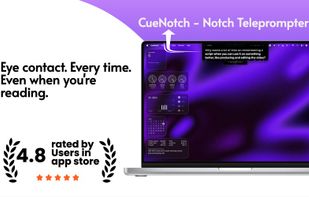
Last-minute pitch, no time to memorize. CueNotch turns your MacBook notch into a private teleprompter, so you can read near the camera, keep eye contact, and stay on track.

Cost / License
- Freemium (Pay once)
- Proprietary
Application type
Platforms
- Mac


Features
CueNotch News & Activities
Highlights All activities
Recent activities
 Tarik-Belaid added CueNotch as alternative to CuePrompter
 designaway added CueNotch as alternative to Take Toucan
 Wendy Zhang added CueNotch as alternative to Teleprompter-scrolling scripts
- cuenotch_founder added CueNotch
- Paul updated CueNotch
 cuenotch_founder added CueNotch as alternative to NotchPrompter, SyncVocal, Teleprompter, TalkEze and 17 more



CueNotch information
Developed by
Siddharth RadhakrishnanLicensing
Proprietary and Freemium product.Pricing
One time purchase (perpetual license) that costs $30 + free version with limited functionality.Alternatives
25 alternatives listedBadge
Get an embeddable badge for CueNotchSupported Languages


No comments or reviews, maybe you want to be first?