Crosscheck icon
Crosscheck icon

Crosscheck

Crosscheck alter how team report bugs. Capture every detail with visual session replay. Fix Faster.
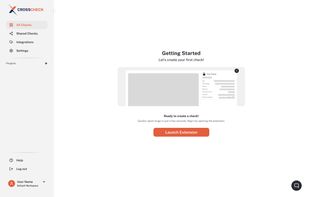
CrossCheck Welcome Dashboard

Cost / License

  • Freemium (Subscription)
  • Proprietary

Application type

Platforms

  • Software as a Service (SaaS)
  • Google Chrome
0likes
1comment
0articles

Features

Properties

  1.  Lightweight
  2.  Privacy focused

Features

  1.  End-to-End Encryption
  2.  No Tracking
  3.  Real time collaboration
  4.  Works Offline
  5.  Dark Mode
  6.  Annotate Screenshot
  7.  Extensible by Plugins/Extensions
  8.  Cloud Sync
  9.  Bug reporting
  10.  Team Collaboration
  11.  Visual feedback
  12.  Screen Recording
  13.  Browser extension
  14.  Debugging
  15.  Issue Tracking

Crosscheck News & Activities

Highlights All activities

Recent activities

Crosscheck information

  • Developed by

    US flagAsad Baig
  • Licensing

    Proprietary and Freemium product.
  • Pricing

    Subscription ranging between $6 and $12 per month + free version with limited functionality.
  • Alternatives

    1 alternatives listed
  • Supported Languages

    • English

Our users have written 1 comments and reviews about Crosscheck, and it has gotten 0 likes

Crosscheck was added to AlternativeTo by Sarah Tariq on and this page was last updated .

Comments and Reviews

   
Sarah Tariq
0

I like Crosscheck because it brings together QA professionals, developers, project managers, and owners on one unified platform and by connecting these key roles, Crosscheck streamlines your workflow and speeds up decision-making with real-time updates on project progress, team performance, and software quality.

Review by a new / low-activity user.

What is Crosscheck?

Full description: Crosscheck is a powerful, all in one bug reporting and visual feedback tool designed to simplify how teams capture, communicate, and resolve issues. Unlike traditional tools, Crosscheck enables users to instantly record bugs through screen capture, replay sessions, and annotated screenshots, eliminating long, confusing back and forth explanations.

Its unique strength lies in combining real time recording, instant sharing, and contextual insights into a single Chrome extension, making it incredibly fast and frictionless. Whether you're a developer, tester, or product manager, Crosscheck ensures that every issue is reported with clarity, precision, and actionable detail, saving time, reducing miscommunication, and accelerating product development.

Tags: bug reporting, visual feedback, screen recording, issue tracking, QA testing, product management, developer tools, browser extension, Chrome extension, session replay, screenshot annotation, team collaboration, debugging.

Features:

  • Instant bug reporting with one-click capture
  • Screen recording with replay functionality
  • Annotated screenshots for clear visual feedback
  • Automatic capture of technical details (browser, OS, console logs)
  • Shareable links for quick team collaboration
  • Chrome extension for fast and easy access
  • Real-time issue reporting without disrupting workflow
  • Session history to revisit and track bugs
  • Lightweight and fast performance Designed for developers, QA testers, and product managers Eliminates lengthy written bug descriptions

Official Links
