Crontap
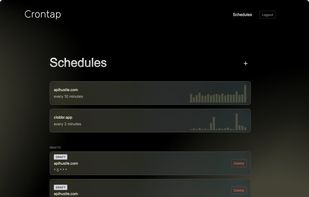
Crontap is a hosted cron job and webhook scheduler for recurring HTTP/API calls. It lets you schedule calls to any URL, API endpoint, webhook, automation workflow, or serverless function without running your own cron server, worker, queue, or cloud scheduler.
Instead of maintaining infrastructure just to trigger recurring jobs, you paste in a URL, choose a schedule, configure the request, and Crontap runs it for you.
What Crontap does
Crontap helps you schedule recurring HTTP requests using cron expressions or plain English. It is useful for triggering backend jobs, automation workflows, health checks, reports, data syncs, cache refreshes, and other recurring tasks.
You can use Crontap to:
- Schedule API calls and webhooks
- Trigger jobs every minute, hour, day, week, or custom cron interval
- Use plain-English scheduling instead of manually writing cron syntax
- Configure HTTP methods, headers, and JSON payloads
- Run jobs in specific timezones
- Test a scheduled request instantly with a “run now” action
- View run history, response status, duration, and response body
- Get notified when a scheduled request fails
- Monitor public URLs with built-in uptime checks
- Connect scheduled jobs to tools like Zapier, Make, n8n, Discord, Slack, custom APIs, and serverless functions
Common use cases
- Triggering a serverless function on a schedule
- Running an API health check every few minutes
- Calling a webhook in Zapier, Make, n8n, or IFTTT
- Replacing unreliable WordPress wp-cron behavior
- Refreshing cached data
- Syncing inventory or external data
- Sending scheduled reports or digests
- Polling third-party APIs
- Running cleanup tasks
- Monitoring whether an endpoint is still responding
- Replacing basic Linux crontab jobs with a hosted dashboard
Who Crontap is for
Crontap is best for people who need reliable scheduled HTTP calls but do not want to maintain cron infrastructure.
It is especially useful for:
- Developers
- Indie hackers
- SaaS teams
- Automation builders
- No-code and low-code users
- Agencies
- Technical founders
- WordPress site owners
- E-commerce operators
- Teams using webhooks heavily
What makes Crontap different
Crontap focuses on one job: running HTTP requests on a schedule and making the result visible.
Compared with traditional crontab, Crontap adds a hosted dashboard, request configuration, logs, retries, alerts, and easier debugging.
Compared with cloud schedulers, Crontap is simpler to set up for HTTP-based jobs and does not require managing cloud-specific scheduler resources, IAM rules, or service accounts for every small task.
Compared with broad automation tools, Crontap gives you more direct control over the schedule itself, including cron syntax and timezone-specific execution.







 WGS added Crontap as alternative to WatchGoose
 09feral-blasts added Crontap as alternative to Tickstem, Healthchecks.io, Honeybadger, notimon and 18 more




No comments or reviews, maybe you want to be first?