Crateview icon
Crateview icon

Crateview

 Like

Crateview is a web interface for Docker and OCI container registries. It connects to an existing registry through the Registry HTTP API V2, providing a browser interface for discovering repositories, browsing tags and inspecting container images.
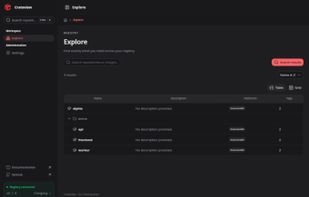
Repository overview in dark mode — Crateview v0.7.0

Cost / License

  • Free
  • Open Source (MIT)

Since

  • New

Updated

  • Updated Nov 2026

Platforms

  • Self-Hosted  Requires a Docker/OCI registry. Published container image: Linux amd64.
  • Docker
0likes
0articles
Save

Features

Features

Highlights All activities

Crateview News & Activities

Recent activities

Crateview information

AlternativeTo Category

Development

GitHub repository

  •  1 Stars
  •  0 Forks
  •  1 Open Issues
  •   Updated  
View on GitHub

Popular alternatives

View all
Crateview was added to AlternativeTo by Tobias Wälde on and this page was last updated .

No comments or reviews, maybe you want to be first?

Official Links

What is Crateview?

Crateview is a web interface for Docker and OCI container registries. It connects to an existing registry through the Registry HTTP API V2, providing a browser interface for discovering repositories, browsing tags and inspecting container images.

Image details include multi-platform manifests, operating system and architecture, layer sizes, image history, labels and OCI annotations. Users can inspect raw manifest and configuration JSON, view OCI referrers, and copy commands for Docker, Podman, Skopeo and ORAS.

Crateview supports anonymous registries and htpasswd authentication, with optional integrated account management. Branding and themes are configurable, and the interface includes light and dark modes and 13 languages.

Deployment uses Docker Compose, either alongside a Distribution registry or connected to an existing registry. The published container image currently targets Linux amd64. Crateview provides the interface; a separate registry stores and serves the images. Manifest deletion is optional and must be explicitly enabled.