





Convertessa
1 like
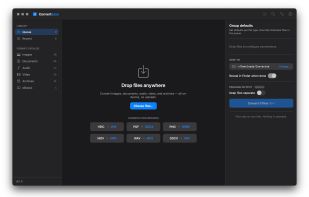
Batch-convert images, audio, video, documents, archives, eBooks and fonts in a native macOS interface. Files are processed locally, with compression, resolution and bitrate controls plus Finder Quick Actions, history, output names and command-line automation.

Platforms
- Mac


Features
Highlights All activities
Convertessa News & Activities
Recent activities
Worth the price! Runs smoothly and handles all my batch video conversion needs
- Jack-ee liked Convertessa
 Daler Azimov added Convertessa as alternative to FFmpeg Batch AV Converter, Resizing.app and LinksConverter
 Daler Azimov added Convertessa as alternative to Zamzar
- Daler Azimov added Convertessa
- Mauricio B. Holguin updated Convertessa
 Daler Azimov added Convertessa as alternative to File Converter, CloudConvert, Online Convert, Any Video Converter and 3 more



Licensing
Proprietary and Commercial product.Pricing
One time purchase (perpetual license) that costs $19.Alternatives
10 alternatives listedBadge
Get an embeddable badge for ConvertessaSupported Languages


Comments and Reviews
Worth the price! Runs smoothly and handles all my batch video conversion needs