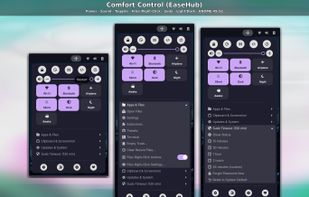
Comfort Control (EaseHub) is a free, open-source (MIT) GNOME Shell extension for the GNOME desktop on Linux. It runs on GNOME 45 to 51, on both Wayland and X11/Xorg sessions, and puts everyday controls in one compact panel menu of about ten rows.
Power: Lock, Log Out, Suspend, Restart and Power Off through GNOME Shell's own system actions, with a confirmation before anything but Lock.
Sound and quick toggles: mute, a volume slider for the current output, and tiles for Wi-Fi, Bluetooth, Airplane Mode, Do Not Disturb, Dark Mode, Night Light and Keep Awake. Tiles show the live state and hide when the hardware or service is missing.
Apps and Files: open Files, Settings, Extensions, Tweaks or a terminal, Empty Trash (shows the item count and asks first) and Clear Recent Files. Clipboard and Screenshot: GNOME's built-in screenshot tool with a gnome-screenshot fallback, and clearing the clipboard or primary selection.
Updates and System: check for updates and upgrade packages with APT, DNF, Zypper or Pacman (Arch uses checkupdates, never a partial upgrade), update Flatpaks, and reload GNOME Shell on X11. Commands run in your terminal and pkexec asks for your password.
Sudo Timeout: choose how long sudo remembers your password (15, 30, 60 or 120 minutes, a custom value, or the system default), forget it now, or share one login across terminals. Every change is checked with visudo, written to a single drop-in file, backed up, and rolled back if validation fails. EaseHub never sees or stores your password.
Files right-click menu (optional): adds Scripts > EaseHub to Files (Nautilus) with Copy Name, Full Path, Quoted Path and File URI, Open Terminal Here, Open in Editor, Size and Type, SHA-256 checksum and Make Executable. Works with several files, spaces, quotes and non-Latin names.
Preferences cover compact or classic layout, System, Light or Dark appearance, panel icon and position, a keyboard shortcut, confirmations, ten supported terminals, hiding any item, and Reset all settings. No tracking, no network calls, no account. Releases are signed and carry a build-provenance attestation.







 Nick Otmazgin added Comfort Control EaseHub as alternative to Caffeine for Linux, Stimulator, Only Switch, 1Setter and 6 more
 Nick Otmazgin

No comments or reviews, maybe you want to be first?