

Collage Studio icon
Collage Studio icon

Collage Studio

 1 like

Collage Studio is a free browser app that automatically arranges up to 300 of your own photos into one print-ready or screen-sized collage, without fixed templates and without uploading anything.
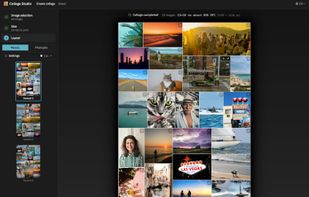
Drop in your photos and Collage Studio builds the layout for you. Every photo gets a place that suits its shape, with no templates and no empty slots. You get three variants to choose from, can regenerate as often as you like, and end up with a print-ready file in seconds, made right in your browser.

Cost / License

  • Free
  • Proprietary

Application type

Since

  • New

Platforms

  • Online
1like
0articles
Save

Features

Properties

Features

Highlights All activities

Collage Studio News & Activities

Recent activities

Collage Studio information

AlternativeTo Category

Photos & Graphics

Popular alternatives

View all
Collage Studio was added to AlternativeTo by Marcus-Cedergren on and this page was last updated .

No comments or reviews, maybe you want to be first?

What is Collage Studio?

Collage Studio is a free web app for making photo collages from large sets of images. Most collage tools put your photos into a fixed template or a rigid grid, and often crop away large parts of each image to make it fit. Collage Studio builds every layout from scratch around your photos instead: tall photos get tall slots, wide photos get wide ones, and the canvas is filled as completely as possible. A single collage can hold anywhere from 3 to 300 photos.

The layout engine is a genetic algorithm, and starts from many random arrangements and evolves them over hundreds of generations, keeping the ones that fill the canvas well. The engine is compiled to WebAssembly and runs in parallel on every CPU core of your device, so even hundreds of photos usually take only seconds. Each run gives you three variants to choose from, shown as a mosaic or as a photo pile, and you can regenerate as often as you like. You can crop any photo, or prioritise it ×2, ×3 or ×5 so it is more likely to get more space and a more central position.

Collages can be sized for print, such as 300 DPI posters at 50×70 cm or A3, or for screens and social media, such as square and portrait posts, 9:16 stories, banners, 4K desktops or a custom size. The result is saved as PNG or JPEG.

Everything happens in the browser. Your photos and the finished collage never leave your device, and you don't need an account or need to install anything. The only data sent is anonymous performance statistics, never images or filenames.