CodeCatch icon
CodeCatch icon

CodeCatch

Mac menu bar app that copies verification codes and sign-in links from Messages and mail, so you can paste them in any browser or app.
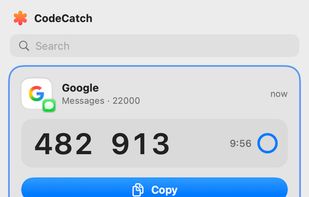
The menu: the newest code on top, recent codes and sign-in links below

Cost / License

Platforms

  • Mac  Requires macOS 15 or later
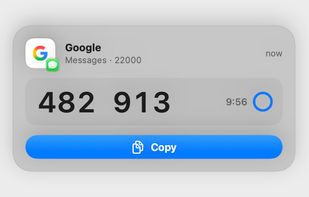
The banner that appears when a code arrives
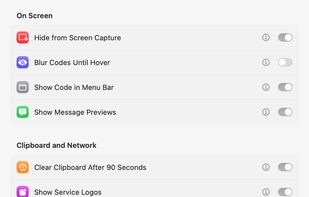
Privacy settings
Alternatives
0likes
0alternatives
0articles
Save

Features

Properties

  1.  Privacy focused

Features

  1.  Ad-free
  2.  No Tracking
  3.  No registration required
  4.  Two-factor Authentication
  5.  Sits in the menu bar
  6.  Support for Keyboard Shortcuts

CodeCatch News & Activities

Highlights All activities

Recent activities

CodeCatch information

AlternativeTo Category

Security & Privacy

GitHub repository

  •  0 Stars
  •  0 Forks
  •  0 Open Issues
  •   Updated  
View on GitHub
CodeCatch was added to AlternativeTo by Uros Gazvoda on and this page was last updated .

No comments or reviews, maybe you want to be first?

Official Links

What is CodeCatch?

CodeCatch sits in the Mac menu bar. When a verification code or a sign-in link arrives in Messages or your mail, it copies it and shows a small banner. Press Cmd+V and you are in, in Chrome, Arc, Firefox, Safari or any other app.

What it does:

  • Reads codes from iMessage and forwarded SMS, Apple Mail, Gmail and other IMAP accounts. Mail is only read, never changed.
  • Shows sign-in links next to your codes, tells you where a link goes, and warns you when it leads to a different site than the sender's.
  • Keeps recent codes in the menu for seven days, with search.
  • Can show the two-step codes from your Bitwarden vault, locked behind Touch ID or your Mac password.
  • Recognises codes in about 35 languages.
  • Can type the code for you. This is off by default.

Privacy: there is no account and no server. Codes stay in memory on your Mac, passwords stay in the Keychain, and a copied code is cleared from the clipboard after 90 seconds.

CodeCatch is free and open source under GPL-3.0. It needs macOS 15 or later and runs on Apple silicon and Intel.