

Codayak icon
Codayak icon

Codayak

Codayak is a free Windows AI coding workbench — a development sidekick for .NET and C# teams that works beside Visual Studio. Most AI tools help you write code; Codayak helps you ship it.
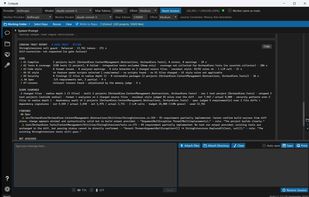
Every change proved: build, 3,198 tests, style, security, spec and learned lessons — a trust band with file-and-line evidence, and nothing hidden.

Cost / License

  • Free
  • Proprietary

Application type

Platforms

  • Windows  Requires an API key from a supported LLM provider (e.g. Anthropic, OpenAI, Google or xAI). Windows 10 (1809+) or Windows 11, 64-bit.
0likes
0articles
Save

Features

Properties

  1.  Support for Themes
  2.  Privacy focused
  3.  AI-Powered

Features

  1.  Dark Mode
  2.  No registration required
  3.  Ad-free
  4.  UI testing
  5. GitHub icon  GitHub Integration
  6. Azure DevOps icon  Azure DevOps integration
  7.  C-sharp
  8.  Code generation
  9. Microsoft Visual Studio icon  Visual Studio integration
  10.  Pull requests
  11.  Unit Testing

Codayak News & Activities

Highlights All activities

Recent activities

Codayak information

Codayak was added to AlternativeTo by Andrew Sweaney on and this page was last updated .

No comments or reviews, maybe you want to be first?

Official Links

What is Codayak?

Codayak is a free Windows AI coding workbench — a development sidekick for .NET and C# teams that works beside Visual Studio. Most AI tools help you write code; Codayak helps you ship it.

Built for .NET teams, but not limited to them: Codayak reads, writes and reviews code in any language your LLM understands, including JavaScript, TypeScript, Python and SQL. Building, running tests and the Trust Engine's build and test verification are tuned for .NET today.

Point it at a repository and it maps every project and dependency, turns a vague ticket into a user story with acceptance criteria, and shows the blast radius of a change before anything is touched. It writes and patches code, builds with MSBuild, runs your unit tests (xUnit, NUnit, MSTest), executes SQL against SQL Server, PostgreSQL, MySQL, SQLite or Oracle, and drives a real browser or Windows desktop app to test the UI.

Its Trust Engine then proves the change: build, tests, security scan, your team's coding standards and spec compliance, reported as a trust band with file-and-line evidence. It reviews pull requests in Azure DevOps and GitHub under your team's rules, and works with work items and wikis. Every write is backed up and shown in a side-by-side diff.

No subscription and no metering: it uses your existing LLM provider API keys (Anthropic, OpenAI, Google, xAI and more) and manages prompt caching and context to keep the token bill down.
