

ClapClip AI icon
ClapClip AI icon

ClapClip AI

 Like

Simple, real-time AI face swap for Windows: automatic face detection, multi-face, batch export, local processing, no video length limit.
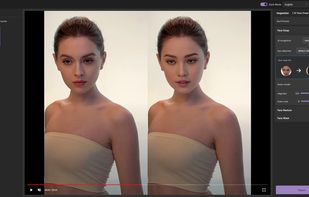
Face swap editor with dual preview: original on the left, swapped result on the right, updated in real time

Cost / License

  • Freemium (Pay once or Subscription)
  • Proprietary

Application type

Since

  • Since 2025

Platforms

  • Windows
0likes
0articles
Save

Features

Properties

Features

Highlights All activities

ClapClip AI News & Activities

Recent activities

ClapClip AI information

  • Developed by

    ClapClip
  • First released

    2025
  • Licensing

    Proprietary and Freemium product.
  • Pricing

    One time purchase that costs $199, and / or subscription that costs $18 per month + free version with limited functionality.
  • Alternatives

    6 alternatives listed
  • Badge

    Get an embeddable badge for ClapClip AI
  • Supported Languages

    • English
    • German
    • Spanish
    • French
    • Japanese
    • Korean
    • Portuguese
    • Chinese
ClapClip AI was added to AlternativeTo by ClapClip on and this page was last updated .

No comments or reviews, maybe you want to be first?

Official Links

What is ClapClip AI?

ClapClip AI is a simple, real-time face swap app for Windows 10 and 11. One photo of the new face is all it needs: it detects faces automatically, swaps several people at once, exports whole batches of videos and photos, and processes everything locally on your own graphics card, with no limit on video length.

Key features:

  • Simple to use: pick one photo and click. No model training, no Python, no command line and no settings to learn first. Install from the Microsoft Store and start.
  • Real-time preview: see the swap live while you change the source face or settings, before anything is rendered.
  • Automatic face detection: faces are found and tracked in every frame without manual masking or keyframes.
  • Multi-face swap: replace several people in the same scene, each with their own source face.
  • Batch export: queue many videos or photos with the same face and export them in one run.
  • No video length limit: process clips of any length, from a few seconds to hours of footage. There is no time cap; only your hardware and free disk space set the limit.
  • 100% local processing: runs on NVIDIA, AMD and Intel graphics cards through DirectML. Footage is never uploaded.
  • Videos, photos and live webcam: also swaps faces in a live camera feed for streams and video calls.
  • Four face swap models to choose from; exported videos have no watermark.

Besides face swap, the same desktop app includes local video and photo enhancement (denoising, sharpening, restoring old footage) and offline speech-to-text transcription.

The app is free to download and the real-time preview is free. Exporting face swaps requires an in-app purchase, either a subscription or a one-time lifetime licence.

Only use faces and footage you have permission to use.