Cisdem PDFMaster icon

Cisdem PDFMaster

Cisdem PDFMaster offers a complete PDF solution to help you work with PDF files in a highly productive way: convert, create, edit, split, compress, encrypt and unlock PDF files.
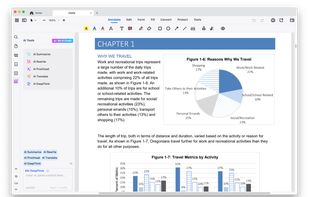
Cisdem PDFMaster screenshot 1

Cost / License

  • Pay once
  • Proprietary

Application types

Platforms

  • Mac
  • Windows
2likes
2comments
0articles

Features

Properties

  1.  Support for Themes
  2.  Privacy focused
  3.  Lightweight

Features

  1.  Split PDF files
  2.  PDF annotation
  3.  Print to PDF
  4.  Portable
  5.  OCR
  6.  Full-Text Search
  7.  No Tracking
  8.  Handwritten Notes
  9.  PDF encryption
  10.  Fill PDF Forms
  11.  Sign PDF files
  12.  Works Offline
  13.  Ad-free
  14.  Combine PDF
  15.  PDF compression
  16.  Text to Speech
  17.  AI-Powered

Cisdem PDFMaster News & Activities

Highlights All activities

Recent activities

  • NancyG reviewed Cisdem PDFMaster  

    I deal with a constant flow of reports, site photos, and marked-up PDFs that need quick turnaround. I’ve tried several different apps, but Cisdem PDFMaster fits my workflow better than most. I can open large inspection files without lag, add precise annotations during reviews, and quickly merge or split documents before sending them out to clients or contractors.

    What I really like is how straightforward everything is—no digging through complicated menus when I’m on a tight schedule.

  • NancyG and Oriel liked Cisdem PDFMaster
  • Melvinberryyy reviewed Cisdem PDFMaster  

    To be honest, Cisdem PDFMaster has become one of the basic tools I use almost every day, whether for work or managing paperwork in life. I remember scrambling before a deadline trying to combine a dozen different reports and scans into one polished PDF for a client. PDFMaster handled it in a few clicks with its batch merge, saving me hours and a major headache. That alone felt worth it. It’s not flashy, but it’s incredibly reliable and tackles those annoying PDF tasks efficiently that used to...

  • cisdeminc updated Cisdem PDFMaster

Cisdem PDFMaster information

  • Developed by

    HK flagCisdem
  • Licensing

    Proprietary and Commercial product.
  • Pricing

    One time purchase (perpetual license) ranging between $49 and $79.
  • Alternatives

    2 alternatives listed
  • Supported Languages

    • English
    • Chinese
    • French
    • German
    • Arabic
    • Italian
    • Japanese
    • Polish
    • Portuguese
    • Russian
    • Spanish

AlternativeTo Category

Office & Productivity

Popular alternatives

View all

Our users have written 2 comments and reviews about Cisdem PDFMaster, and it has gotten 2 likes

Cisdem PDFMaster was added to AlternativeTo by cisdeminc on and this page was last updated .

Comments and Reviews

   
NancyG
0

I deal with a constant flow of reports, site photos, and marked-up PDFs that need quick turnaround. I’ve tried several different apps, but Cisdem PDFMaster fits my workflow better than most. I can open large inspection files without lag, add precise annotations during reviews, and quickly merge or split documents before sending them out to clients or contractors.

What I really like is how straightforward everything is—no digging through complicated menus when I’m on a tight schedule.

Review by a new / low-activity user.
Melvinberryyy
0

To be honest, Cisdem PDFMaster has become one of the basic tools I use almost every day, whether for work or managing paperwork in life. I remember scrambling before a deadline trying to combine a dozen different reports and scans into one polished PDF for a client. PDFMaster handled it in a few clicks with its batch merge, saving me hours and a major headache. That alone felt worth it. It’s not flashy, but it’s incredibly reliable and tackles those annoying PDF tasks efficiently that used to waste so much time, such as editing, converting, signing, measuring, protecting and more. If you deal with PDFs regularly, it genuinely makes things easier. Totally recommend giving the free trial a spin!

What is Cisdem PDFMaster?

Cisdem PDFMaster offers a complete PDF solution which allows you to convert, create, edit, merge, split, compress, encrypt and unlock PDFs productively. Windows download link: https://download.cisdem.com/cisdem-pdfmaster.exe Mac download link: https://download.cisdem.com/cisdem-pdfmaster.dmg

Main Features of Cisdem PDFMaster: 1.Edit text and images Simply select the paragraph text in PDF and edit/modify/delete the existing text like editing a Word document, you can easily change the font style, size and color too. Plus, it allows users to insert images into anywhere, rotate, move, or adjust them to proper size.

2.Easily add annotations and make comments With PDFMaster you can add annotations to any PDF document - highlight/underline/strikeout text, add shapes, comments, callout, links, drawings, stamps, measurement, even signatures.

3.Manipulate PDF files and pages No matter if users want to rotate, extract, insert, split or replace pages in PDF, this PDF organizer can easily and quickly manipulate PDF files and pages with a few clicks.

4.Fill out and create PDF forms With the powerful PDF form filler and creator, users can make a PDF form fillable by adding digital signature fields, checkbox fields, radio fields, list box fields and combo box fields in less than a minute.

5.Convert PDF files with OCR feature Cisdem PDFMaster enables users to export PDF into 15+ popular file formats and create PDF from 40+ formats with batch mode. In addition, it comes with a powerful OCR function that allows users to turn scans to searchable or editable files.

6.Protect important documents and sensitive information This PDF protector provides multiple security options for users: set open password or permissions password, mark for redaction (permanently remove sensitive information), add watermark and add digital signature with a certificate-based digital ID.

7.Remove password protection from PDF It makes it easy to remove restrictions of copying and printing from PDF without damaging the original file. Also, users can remove open restriction by entering password.

8.Reduce PDF File size without losing quality Depending on the robust size-reducing techniques, PDFMaster can reduce the file size up to 90% while retaining high quality.

9.Compare two similar documents Quickly identify the text differences between two similar PDF documents and highlight changes in different colors.
