The missing audio + video editor for Mac. Open a clip, chop it, ship it — no project to set up, no render queue, no two-day tutorial. The everyday tool for the cuts you make 20 times a week but don't want to fire up Final Cut for.
Every other Mac A/V editor wants a relationship. Final Cut wants a library. Premiere wants a project. DaVinci wants three days of your life. iMovie wants a magic-movie tutorial. Sometimes you just want to trim two minutes off the front of a screen recording, splice two voice memos together, or grab a single frame as a PNG — and you want it done before the app finishes launching.
That's what ChopShop is. The everyday A/V tool that the Mac shipped without. Native, fast, no project setup, no render queue, no cloud account. Drop a file on it and start chopping.
What it does:
Open and go
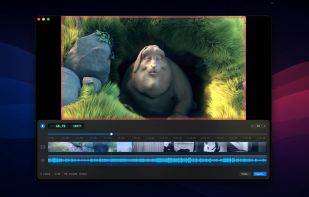
Drag a file in, start cutting. No "create new project," no scratch-disk picker, no media-import wizard. The timeline appears the moment the file lands.
The cuts you actually make
Trim the edges, split at the playhead with ?K, drag to reorder, drop new clips between. Retime, reverse, crop on export. The 90% of editing you do every week — without the 10% you do once a year clogging the toolbar.
Ship it lossless
If your edit doesn't need re-encoding, ChopShop won't. Same codec, same bitrate, no quality loss — exports finish in seconds, not minutes. Falls back to a clean re-encode the moment you add a crop or stack mismatched formats.






No comments or reviews, maybe you want to be first?