
Chirpy Pro icon
Chirpy Pro icon

Chirpy Pro

Plays a different notification sound for every Slack channel, contact, or Mac app, so you know what happened without looking.
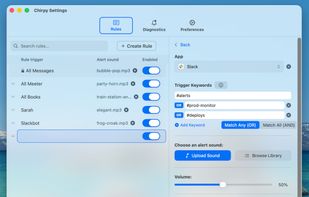
Create rules

Cost / License

  • Pay once
  • Proprietary

Platforms

  • Mac
1like
0articles

Features

Chirpy Pro News & Activities

Highlights All activities

Recent activities

Chirpy Pro information

AlternativeTo Category

OS & Utilities
Chirpy Pro was added to AlternativeTo by Danilo-Znamerovszkij on and this page was last updated .
No comments or reviews, maybe you want to be first?

Official Links

What is Chirpy Pro?

Every notification on your Mac sounds the same. A message from your boss, a calendar reminder, and a meme in #random all make the identical ping, so you check all of them. Chirpy gives each notification its own sound, so your ears do the triage instead of your eyes.

Chirpy lives in your menu bar and works with anything that posts a macOS notification: Slack, Teams, Discord, Mail, Messages, Calendar, browser push, and more. You write simple rules and Chirpy plays the right sound when they match.

Rules can target an app, a channel, a person, or a keyword, and combine conditions with AND, OR, NOT, and wildcards. A rule can play one of the 72+ built-in sounds, a sound you upload, or a spoken sound generated from text. Rules can also speak notifications aloud with a voice you pick, run a Shortcuts.app shortcut, or boost volume up to 200% for the alerts that need to cut through.

Chirpy is 100% local. Notification text never leaves your Mac, there is no cloud and no account. It uses the macOS Accessibility API to read notifications, which is why it can match on who sent a message and what it says, not just which app sent it. That approach is incompatible with App Store sandboxing, so Chirpy is a direct download only.

$19.99 one-time, lifetime license, activates on 2 Macs, free updates. 3-day free trial, no credit card required.

Chirpy Pro Videos

