CARACAL is self-hosted, open-source digital signage for Raspberry Pi 4/5 and PCs. It turns any screen into a fullscreen Chromium player for web pages, Grafana dashboards, images and videos, all managed from a clean web admin.
Shows pages behind a login, hands-free
Most signage players stop at a login screen. CARACAL gets through it. Save an encrypted login profile once and the player signs in automatically every time: classic login forms, HTTP Basic/Digest authentication and the browser’s own sign-in pop-up. Common cookie banners are accepted automatically too, so internal tools, intranets, monitoring systems and SaaS dashboards stay on screen without anyone touching a keyboard. Credentials are stored encrypted on the device.
Built for office, NOC and status screens
Web pages, images and videos in one playlist with drag-and-drop ordering
Per-item duration and zoom, adjustable live with a slider
Grafana collections: every dashboard with a given tag, refreshed on each cycle through guest access
Dark mode for websites, per item or for the whole device
Live control: show or freeze an item or a collection, skip, resume
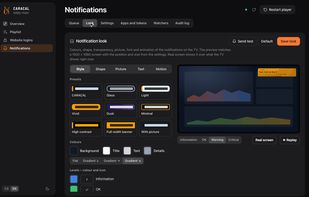
On-screen pop-up notifications from Grafana, Alertmanager, Uptime Kuma or your own scripts through a token-protected API, plus watchers for Zammad, Jira, Redmine, Freshdesk, GitLab, GitHub or any JSON API
Runs unattended
A fullscreen watchdog restarts the player if a page leaves the screen black, and the player and device can be restarted from the admin UI. It even runs on a Raspberry Pi 4 with 1 GB of RAM thanks to a low-memory mode.
Scale to many screens with CARACAL Fleet
CARACAL Fleet manages all your screens centrally. It can prepare zero-touch SD cards, install nodes over SSH, update them, and give you an SSH console in the browser.
Install with Docker (arm64 and amd64) or a one-line script on Raspberry Pi OS / DietPi. Czech and English UI, dark mode, GPL-3.0, no subscription, no cloud.






 EU


 Gelluithor added Caracal Digital signage as alternative to Screenly, Anthias, DAKboard, Webpage Signage Runner and 9 more

 Gelluithor


No comments or reviews, maybe you want to be first?