
Calcpad icon
Calcpad icon

Calcpad

 11 likes

Calcpad is a lightweight mathematical platform for cloud and desktop. It parses simple text scripts and converts them into professional Html reports. Supports complex numbers, variables, functions, graphing, units and numerical methods.
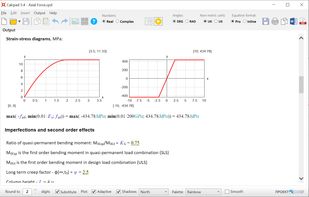
Design of RC column

Cost / License

  • Free
  • Open Source (MIT)

Since

  • Since 2017

Platforms

  • Windows  Requires .NET 8.0
  • Linux  No GUI. Works with Sublime + Chromium.
  • Online
11likes
0articles
Save

Features

Properties

Features

Highlights All activities

Calcpad News & Activities

Recent News

No news, maybe you know any news worth sharing?

Share a News Tip

Recent activities

Comments and Reviews

   
AndreLester
0

Love it! Easy, get started quickly. Fast and text based.

Guest
0

Calcpad is best for engineering calculation notes!

Review from a new or low-activity account — shown here, but not counted in the app rating.
sch____
1
Review from a new or low-activity account — shown here, but not counted in the app rating.
Nedelcho Ganchovski
3

Simple and easy to learn

Official Links

What is Calcpad?

Calcpad is a lightweight mathematical platform, available for both cloud and desktop. It parses simple text scripts and converts them into professional Html reports. It is quick and easy to learn. No special programming skills are required. It is a great tool for developing and using engineering spreadsheets. It includes a lot of advanced features:

  • real and complex numbers;
  • built-in library with standard math functions;
  • named variables and custom functions of multiple parameters f(x; y; z; ...);
  • units of measurement;
  • vectors and matrices;
  • potting of functions of one or two parameters;
  • numerical methods for root and extremum finding, numerical integration and differentiation;
  • finite sums, products and general inline iterative procedures;
  • insertion of "titles" and 'comments', containing plain text, Html, CSS, SVG, images and tables for better formatting;
  • conditions to split the program flow (#if - #else - #end if) and cycles (#repeat - #loop) to perform repetitive calculations;
  • automatic generation of web forms for data input and beautiful Html reports at the output;
  • output visibility control and content folding;
  • optional substitution of variables in the output;
  • smart rounding of numbers etc.

Calcpad information

Our users have written 4 comments and reviews about Calcpad, and it has gotten 11 likes.

Calcpad was added to AlternativeTo by calcpad on and this page was last updated .