Cadenza is a free, MIT-licensed voice input app for macOS. Hold a configurable shortcut, speak, and release to insert the recognized text at your cursor. A separate tap-to-start-and-stop shortcut is also available.
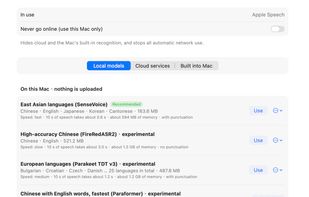
Speech recognition runs locally using models downloaded inside the app. SenseVoice is the recommended starting point. FireRedASR2, Parakeet, Paraformer and Qwen3-ASR are additional, experimental options with different language coverage and resource requirements. Once a suitable model is downloaded, local recognition works offline.
The app includes a vocabulary manager for names and specialist terms, local rules for tidying hesitation sounds and repeated words, optional AI text polish, and voice translation with a separate shortcut. Text polish and translation can use a configured local service; a remote service requires separate consent. Screenshot capture, annotation and text recognition are also available, with Apple Vision as the default local OCR engine; these features are still being tested.
Cadenza requires no app account and has no telemetry. The app does not save recordings. Optional cloud recognition uses the user's own provider credentials and requires permission for each provider. Third-party services may charge for their usage.
This is a publicly downloadable early preview for macOS 14 or later, with a universal package for Apple silicon and Intel. The release is not Apple-notarized, and compatibility with every app and hardware setup is not verified. The interface is available in English and Simplified Chinese.







 Lee Kit added Cadenza (voice input) as alternative to Superwhisper and Wispr Flow


No comments or reviews, maybe you want to be first?