
ByEase File Tools icon

ByEase File Tools

Batch process, convert, split, merge, and compress PDFs and images completely offline on macOS with local Finder integration, secure deletion, metadata cleaning, multiple image formats including HEIC, advanced PDF tools, and full privacy protection.
ByEase File Tools screenshot 1

Cost / License

  • Freemium (Pay once)
  • Proprietary

Platforms

  • Mac
1like
0comments
0articles

Features

Properties

  1.  Privacy focused
  2.  Local-First

Features

  1.  No registration required
  2.  Ad-free
  3.  Works Offline
  4.  Split PDF files
  5.  PDF compression
  6.  Dark Mode
  7.  Offline
  8.  Batch processing
  9.  Remove metadata
  10. Finder icon  Apple Finder Integration
  11.  File Shredder

ByEase File Tools News & Activities

Highlights All activities

Recent activities

ByEase File Tools information

  • Developed by

    UA flagYurii Bonislavskyi
  • Licensing

    Proprietary and Freemium product.
  • Pricing

    One time purchase (perpetual license) that costs $13 + free version with limited functionality.
  • Alternatives

    6 alternatives listed
  • Supported Languages

    • English
    • Arabic
    • Chinese
    • French
    • German
    • Italian
    • Japanese
    • Korean
    • Portuguese
    • Russian
    • Spanish
    • Ukrainian
ByEase File Tools was added to AlternativeTo by Vladyslav Bonislavskyi on and this page was last updated .
No comments or reviews, maybe you want to be first?

What is ByEase File Tools?

ByEase File Tools — Batch PDF and Image Processing for macOS

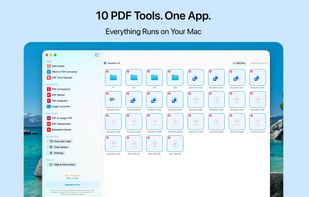
A native macOS app that keeps the entire PDF and image workflow on your own machine. Ten tools in one window, instead of uploading private documents to web services or paying a monthly subscription for what should be an app you own.

WHY BYEASE

Finder Integration — Launch any tool straight from the Finder context menu. Select files and process them without opening the main window.

Whole Folders, Not Just Files — Drop entire folders into the queue and process hundreds of documents and images in a single pass.

Private by Default — Everything runs locally. No servers, no cloud, no analytics, no account. Your documents never leave your Mac.

Native Performance — Universal binary for Apple Silicon and Intel, with a minimal interface that behaves like part of the system.

Pay Once — No subscription. Basic tools stay free permanently; a single purchase unlocks the full set.

TEN TOOLS IN ONE APP

Safe Eraser — Delete files and folders directly, bypassing the Trash. For external hard drives and USB media, multiple overwrite passes (1, 3 or 7, DoD standard) are available to make casual recovery impractical.

Word to PDF Converter — Convert DOC and DOCX files to PDF with original formatting preserved.

PDF Tone Adjuster — Adjust brightness and contrast of pages to make scanned documents easier to read.

PDF Compressor — Reduce PDF size with adjustable resolution and JPEG quality, in either text or raster mode.

PDF Splitter — Split large documents into individual pages or custom ranges.

PDF Integrator — Merge multiple PDFs and images into one structured document.

Image Converter — Batch conversion between JPEG, PNG, HEIC, TIFF and WebP, with quality and filename suffix settings.

PDF to Image-PDF — Flatten text-based PDFs into image-only files so the text cannot be copied or searched.

PDF Standardizer — Bring all pages to a single format: A3, A4 or Letter.

Metadata Cleaner — Remove authorship history, GPS coordinates and technical tags from PDFs and images.

A NOTE ON SECURE DELETION

Overwriting reliably removes data on traditional hard drives and external media. On modern SSDs with APFS, copy-on-write, snapshots and wear leveling mean no overwriting tool can guarantee that original blocks are gone — Apple removed Secure Empty Trash for this reason. Safe Eraser raises the bar substantially against ordinary recovery software; we would rather state this plainly than claim more than the hardware allows.

PRIVACY

The app makes no network requests during processing. There are no servers involved and no access to your content on our side.

Requires macOS 14.6 or later. Universal (Apple Silicon and Intel).

ByEase File Tools Videos

Official Links
