Bulk Receipt Scanner icon

Bulk Receipt Scanner

 Like

Photograph a whole pile of receipts at once. Every receipt in every photo is read and sent to QuickBooks Online or exported as a CSV.
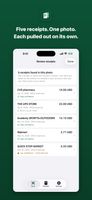
Five receipts found in one photo, each with its own record
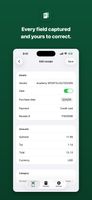
Every field read from the receipt, ready to check or correct
Export a QuickBooks-ready or spreadsheet CSV

Cost / License

  • Freemium (Subscription)
  • Proprietary

Since

  • New

Platforms

  • Online
  • Software as a Service (SaaS)
  • iPhone
0likes
0articles
Save

Features

Properties

Features

Highlights All activities

Bulk Receipt Scanner News & Activities

Recent activities

Bulk Receipt Scanner information

AlternativeTo Category

Business & Commerce
Bulk Receipt Scanner was added to AlternativeTo by Josh-Hunter on and this page was last updated .

No comments or reviews, maybe you want to be first?

Official Links

What is Bulk Receipt Scanner?

Most receipt apps take one receipt per photo. Bulk Receipt Scanner takes the pile. Spread receipts out, photograph them together, and every receipt in the photo becomes its own record: vendor, date, subtotal, tax, total, payment method and line items. A batch holds up to 15 photos with up to 8 receipts in each.

The app checks the arithmetic on every receipt and flags anything that does not add up, so you review the few that need a look, not all of them.

On a paid plan, connect QuickBooks Online and send receipts in as expenses in your own categories with the photo attached, or match them to card charges already there. On any plan, export a QuickBooks-ready CSV, a spreadsheet CSV for Excel or Google Sheets, or a line-item CSV.

It runs in a browser on a phone or a computer, with an optional iPhone app. There is a free plan (5 photos a month), an Individual plan and a Team plan for up to 10 people. Built for bookkeepers, contractors and anyone facing a shoebox of receipts at tax time.

Bulk Receipt Scanner Videos

Show 1 more video