





BugBundler
Like
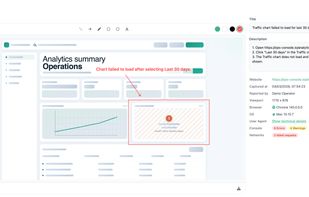
Browser extension captures screenshots, console logs, DOM snapshots, performance metrics, and network activity in one HTML file stored locally. Data never leaves the device, supports sharing by file, no viewer required, and collects environment details for debugging.

Cost / License
- Subscription
- Proprietary
Application type
 EU
EUPlatforms
- Google Chrome

Features
Highlights All activities
BugBundler News & Activities
Recent activities
 MichalK98 added BugBundler as alternative to Marker.io, BugHerd, Usersnap, Jam.dev and 1 more
- MichalK98 updated BugBundler
- MichalK98 thinks No Coding Required is a important feature of BugBundler
- MichalK98 thinks Bug reporting is a important feature of BugBundler
- MichalK98 thinks GDPR Compliant is a important feature of BugBundler
- MichalK98 thinks No Tracking is a important feature of BugBundler
- MichalK98 thinks Ad-free is a important feature of BugBundler
- MichalK98 thinks Annotate Screenshot is a important feature of BugBundler
- MichalK98 thinks Privacy focused is a important feature of BugBundler
- Danilo Venom updated BugBundler
Developed by
 Michal Kurowski
 Licensing
Proprietary and Commercial product.Pricing
Subscription ranging between $27 and $29 per month.Alternatives
5 alternatives listedBadge
Get an embeddable badge for BugBundlerSupported Languages


No comments or reviews, maybe you want to be first?