
Budget Master 9000 icon

Budget Master 9000

Budget Master 9000 is a private offline budget app for Windows 10 and up. It allows you to easily see your budget vs your actual spending so that you know where you need to make adjustments.
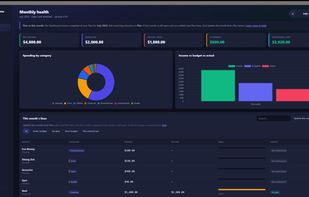
Everything at a glance via your dashboard.

Cost / License

  • Free
  • Open Source (MIT)

Platforms

  • Windows
0likes
0comments
0articles

Features

Properties

  1.  Privacy focused

Features

  1.  Cash Flow Analysis
  2.  Dark Mode
  3.  No registration required
  4.  Goal Tracking
  5.  Portable
  6.  Works Offline
  7.  Ad-free
  8.  Desktop Application
  9.  Expense Tracking
  10.  SQLite
  11.  MIT License
  12.  Offline
  13.  Rust

Budget Master 9000 News & Activities

Highlights All activities

Recent activities

Budget Master 9000 information

  • Developed by

    US flagcodemonkey2k5
  • Licensing

    Open Source (MIT) and Free product.
  • Written in

  • Alternatives

    4 alternatives listed
  • Supported Languages

    • English

AlternativeTo Categories

Business & CommerceOffice & Productivity

GitHub repository

  •  1 Stars
  •  0 Forks
  •  0 Open Issues
  •   Updated  
View on GitHub
Budget Master 9000 was added to AlternativeTo by ibgeek on and this page was last updated .
No comments or reviews, maybe you want to be first?

What is Budget Master 9000?

Your monthly budget, finally clear. See what you planned, what you actually spent, and the real trends — in a simple Windows app you’ll actually use.

Why this exists: Most budgeting tools are either too complicated for what you actually need, or too disconnected from real life. You end up with plans that don’t match reality, or you stop using the tool altogether.

Budget Master 9000 was built to answer three simple questions every month:

What did I plan to spend? What did I actually spend? Where should I adjust next month? It focuses on clarity and real trends so you can see the picture quickly and keep using it.

A typical month:

  1. Set your take-home pay under Settings.
  2. Build or adjust your Plan.
  3. During the month, log spending on Transactions.
  4. Check progress anytime on the Dashboard.
  5. At the end of the month, use Close-Month to review the numbers and save a grade. That’s it. The goal is to make the process light enough that you’ll keep doing it.
