bSaver icon
bSaver icon

bSaver

 2 likes

Your MacBook's battery wears out fastest when it sits at 100%. If your Mac is plugged in most of the day, it spends hours fully charged, and that slowly eats into its capacity. bSaver lets you choose where charging stops, so the battery stays in the healthy middle range.
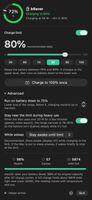
Dark mode
Light Mode

Cost / License

  • Pay once
  • Proprietary

Application type

Since

  • New

Platforms

  • Mac
2likes
0articles
Save

Features

Properties

Features

Highlights All activities

bSaver News & Activities

Recent activities

  • Mateusz Matysczuk replied to a comment / review on bSaver
  • PGRpl reviewed bSaver  

    Does exactly what it promises: keeps the battery healthy without a subscription and without bloat. Set it up once and forget about it — it stays out of the way and barely touches system resources. Fair one-time price, and the developer actually answers emails. Recommended.

  • Mateusz Matysczuk replied to a comment / review on bSaver
  • alexiorchaos reviewed bSaver  

    This app is amazing! Finally an app which can manage charging perfectly. It’s SO much better then AlDente 🤘

  • alexiorchaos liked bSaver
  • Mateusz Matysczuk updated bSaver
  • Mateusz Matysczuk liked bSaver
  • Mateusz Matysczuk added bSaver
  • AlDente icon
    Mateusz Matysczuk added bSaver as alternative to AlDente and BatFi
  • Mateusz Matysczuk updated bSaver

bSaver information

  • Developed by

    PL flagMatM1987
  • Licensing

    Proprietary and Commercial product.
  • Pricing

    One time purchase (perpetual license) ranging between $12 and $19.
  • Alternatives

    2 alternatives listed
  • Badge

    Get an embeddable badge for bSaver
  • Supported Languages

    • English
    • Polish

AlternativeTo Category

System & Hardware

Popular alternatives

View all

Our users have written 2 comments and reviews about bSaver, and it has gotten 2 likes

bSaver was added to AlternativeTo by Mateusz Matysczuk on and this page was last updated .

Comments and Reviews

   
Top Positive Comment
PGRpl
1

Does exactly what it promises: keeps the battery healthy without a subscription and without bloat. Set it up once and forget about it — it stays out of the way and barely touches system resources. Fair one-time price, and the developer actually answers emails. Recommended.

Mateusz Matysczuk
Replying to @PGRpl

Thank you!

alexiorchaos
1

This app is amazing! Finally an app which can manage charging perfectly. It’s SO much better then AlDente 🤘

Mateusz Matysczuk
Replying to @alexiorchaos

Thank you!

Review from a new or low-activity account — shown here, but not counted in the app rating.

What is bSaver?

Your MacBook's battery wears out fastest when it sits at 100%. If your Mac is plugged in most of the day, it spends hours fully charged, and that slowly eats into its capacity. bSaver lets you choose where charging stops, so the battery stays in the healthy middle range.
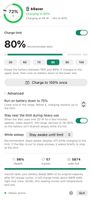
Try it free for 7 days: download bSaver from bsaver.pl, with every feature unlocked. Then buy a license and paste the key into the app.

Licenses (one-time purchase, no subscription, free updates)

  • Personal: $11.99, one Mac at a time
  • House: $18.99, up to 3 Macs in your household

What bSaver does

  • Any charge limit, 0–100%: pick a preset or drag the slider. 80% is recommended for everyday use.
  • Battery rests on the charger: at 80, 85, 90 or 95%, bSaver uses macOS's built-in charge limit. At the limit your Mac runs straight from the charger and the battery rests: no current, no cycling, no extra heat, even while gaming, exporting video or sleeping.
  • Heavy-load protection: with a limit below 80%, heavy work rests the battery on the nearest macOS limit instead of cycling it under load.
  • Thermal guard: below 80%, charging won't restart while the battery is hot (39 °C or more).
  • Calibration charge: after 20 cycles or 30 days, bSaver charges to 100% once, holds it until the cells are balanced, then returns to your limit, so the percentage and health reading stay accurate. Skip it, start it now or turn it off.
  • Charge to 100% once: one click before a trip, then back to your limit.
  • Live charging power and battery health (macOS's Maximum Capacity, cycles, capacity) in plain words.
  • Menu-bar icon with your charge level and a marker at your limit.
  • English and Polish.

Built to be safe

  • No firmware changes: bSaver only switches charging on and off with controls built into your Mac. Voltage, current, temperature and cell protection stay under Apple's control.
  • Remove the helper or the app, and your Mac charges normally again.
  • Signed and notarized by Apple, with secure automatic updates.
  • No account, analytics or tracking. bSaver goes online only to check for updates and verify your license key.

On macOS 27, below 80% macOS has no built-in limit, so bSaver switches the charger off at your limit and the Mac runs on battery down to the bottom of your range before charging again. The app always shows which method is in use.

Requirements

  • MacBook with Apple Silicon (M1 or later); Intel Macs are not supported
  • macOS 14 Sonoma or later
  • One-time approval of bSaver's background helper

Activate in one minute

  1. Drag bSaver from the .dmg into Applications (skip if you're already trying it).
  2. Open it from the menu bar, click Install Helper… and allow it when macOS asks.
  3. Gear menu → License…, paste the key from your receipt, click Activate.

Bought bSaver before version 1.6? No key needed: your Mac stays unlocked.

Support: support@bsaver.pl Terms: https://bsaver.pl/terms.html · Privacy: https://bsaver.pl/privacy.html