Browser Control SDK icon

Browser Control SDK

 Like

Browser Control SDK is a standalone Windows browser built with C++ and Microsoft WebView2. People can browse normally and sign in manually, then control the same browser through Python, JavaScript, C++ or a local standard-input/output MCP server.
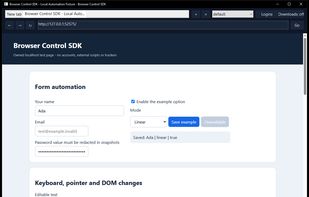
Browser Control SDK running the supplied local demonstration page with synthetic example data.

Cost / License

  • Free
  • Open Source (MIT)

Since

  • New

GitHub

  • GitHub stars: 1

Platforms

  • Windows  Windows 10/11 x64; requires Microsoft Edge WebView2 Runtime.
0likes
0articles
Save

Features

Features

 Tags

Highlights All activities

Browser Control SDK News & Activities

Recent activities

Browser Control SDK information

GitHub repository

  •  1 Star
  •  0 Forks
  •  0 Open Issues
  •   Updated  
View on GitHub

Popular alternatives

View all
Browser Control SDK was added to AlternativeTo by Default-Titan on and this page was last updated .

No comments or reviews, maybe you want to be first?

What is Browser Control SDK?

Browser Control SDK is a standalone Windows browser built with C++ and Microsoft WebView2. People can browse normally and sign in manually, then control the same browser through Python, JavaScript, C++ or a local standard-input/output MCP server.
The API supports explicit tab identifiers, navigation, page snapshots, DOM inspection, form input, clicks and screenshots. Persistent profiles retain browser sessions; users handle authentication and MFA themselves. It is intended for workflows that combine manual browser use with scripted steps, testing and local agent tools.

It controls its own browser application. It does not attach to an existing Chrome or Edge session or import those browsers' profiles. Scripts should keep sensitive submissions and uncertain results under human review.

The browser application, SDKs, examples and MCP server source are MIT licensed. The complete application is free, with no demo timer, account requirement or paid feature unlock. It runs on Windows 10/11 x64 with the WebView2 Runtime; no input driver or administrator access is required for normal use.