One-click toggle to block AI Overviews from Google search results.
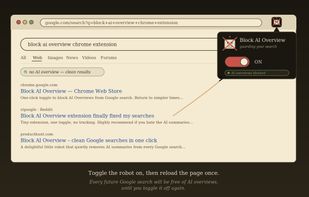
Block Google's AI Overviews with one click. Get back to the clean, classic Google Search results with actual web links and no AI-generated summaries cluttering the top of the page.
AI Overviews can be slow, sometimes wrong, and they push the real search results below the fold. Block AI Overview is an extension that hides them on every Google search you do. Toggle it on and forget about it. Toggle it off when you actually want a summary.
? One click to turn on or off, no settings, no setup
? Works on every Google domain (google.com, google.co.uk, google.de, and 27 others)
? Image, Video, News, and Shopping tabs still work normally
? Confirmation prompt before re-enabling AI Overviews, so you never see one by accident
? No tracking, no analytics, no data collection
? Lightweight, just one toggle, no background processes, no ads
? Setting syncs across all your Chrome browsers
Perfect for researchers, students, writers, developers, or anyone tired of seeing AI summaries on every search. Whether you're looking up a quick fact, doing serious research, or just want Google to feel like Google again, Block AI Overview gives you back the google you remember.
100% free. No account required. Download the extension and pin it to start blocking the AI overview!







 Paul added Block AI Overview as alternative to AI Overview Hider for Google, Remove AI Overview, Hide Google AI Overviews, Turn Off AI Overview and 2 more


No comments or reviews, maybe you want to be first?