Batch Picture Resizer (SoftOrbits) is an offline Windows tool to batch resize images and convert them in bulk. Point it at hundreds or thousands of photos and it will resize, compress and change format in one pass - JPEG, PNG, WEBP, HEIC, RAW and 70+ types - without uploading anything to the cloud. A fast bulk image resizer and image converter built for real photo archives. Set your rules once, apply them to a whole folder, and get consistent output every time - no manual editing, no monthly fee, no file-count limit.
🔰 How to use
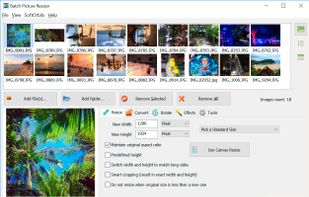
- Add files or a whole folder (drag and drop works too).
- Choose a resize mode: by resolution, percentage, device preset, or exact size with Smart Crop.
- Optionally convert the output format - HEIC or RAW to JPEG, or anything to WEBP.
- Add a watermark, rename rule and target file size in KB if needed.
- Pick the output folder and click Start.
👍 Why choose it
- Batch resize images and batch convert images in a single run - no per-file limit.
- Reads and writes JPEG, PNG, WEBP, HEIC, RAW (CR2, NEF, DNG), PSD, GIF, TIFF - 70+ formats.
- Resize photos by pixels, percent, preset or long-side match, with Smart Crop to an exact aspect ratio.
- Compress images to a target size in KB with auto quality tuning for email and web.
- Ten-plus resize algorithms (Bicubic, Lanczos, Gaussian, BSpline) for sharp results.
- Add text or image watermark, adjust canvas, color, contrast and DPI.
- Rename files in bulk with prefix, suffix, numbering or date; EXIF auto-rotate is lossless.
- Uses all CPU cores, so large batches finish in minutes, not hours.
- Windows Explorer right-click integration plus command-line mode for scripting and automation.
- Animated GIF and multipage TIFF supported; folder structure is preserved on output.
- 100% offline and private - images never leave your PC. One-time purchase, no subscription.
Great for
- Compressing photos for email, presentations and faster websites via WEBP.
- Shrinking a large archive to free up disk or cloud space.
- Converting HEIC and RAW to JPEG for easy sharing.
- Preparing product or listing images at one exact size.
- Watermarking and renaming a full folder before publishing.
- Batch convert images from a new camera or phone into web-ready files.
Can it handle 10,000+ images? Yes - it uses all CPU cores and is built for bulk.
Does it convert between formats? Yes - it doubles as an image converter for JPEG, PNG, WEBP, HEIC and RAW.
Can it resize only if the image is larger? Yes, with a dedicated skip option.
Is it private? Yes - unlike online resizers, nothing is uploaded.
Does it keep folder structure? Yes - the input tree is preserved on output.
Can I automate it? Yes - use the command line to resize photos from scripts or scheduled tasks.
A private, one-time-license alternative to XnConvert, IrfanView, FastStone Image Viewer.







 SoftOrbits added Batch Picture Resizer as alternative to Light Image Resizer, Converseen and Graphic Converter
 Vahzryn added Batch Picture Resizer as alternative to Zapixal
 SoftOrbits added Batch Picture Resizer as alternative to TinyPNG, STT ImageConverter, Switcheroo Image Manipulation, ImBatch and 4 more
 SoftOrbits added Batch Picture Resizer as alternative to ImageMagick, TinyFast, iWinSoft Image Converter, FastStone Photo Resizer and 4 more


 SoftOrbits

No comments or reviews, maybe you want to be first?