
BadgeBar icon
BadgeBar icon

BadgeBar

BadgeBar gives each app that shows a badge on the Dock its own menu bar icon with the unread count. Click an icon to open the app, or right-click it to see recent messages and mark them as read.
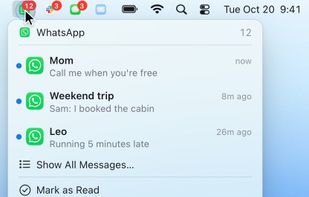
Right-click an app's menu bar icon to see its latest messages and mark them as read.

Cost / License

  • Free
  • Open Source (MIT)

Platforms

  • Mac
0likes
0articles
Save

Features

Properties

Features

Highlights All activities

BadgeBar News & Activities

Recent activities

BadgeBar information

AlternativeTo Category

System & Hardware

GitHub repository

  •  0 Stars
  •  0 Forks
  •  0 Open Issues
  •   Updated  
View on GitHub

Popular alternatives

View all
BadgeBar was added to AlternativeTo by Harikrishnan-V-K on and this page was last updated .

No comments or reviews, maybe you want to be first?

Official Links

What is BadgeBar?

BadgeBar gives each app that shows a badge on the Dock its own menu bar icon with the unread count. Click an icon to open the app, or right-click it to see recent messages and mark them as read.

You can pick a badge style (count on the icon, number beside it, or a dot), play a short pulse or glow when a count goes up, group several apps under one icon that shows their total, and use the app's own icon, a monochrome version or an SF Symbol. Icons can dim or hide when there's nothing new, and apps you haven't added still appear while they have a badge.

BadgeBar needs no account and never connects to the internet. It reads badges through the Accessibility API, and recent messages from Notification Center's history on your Mac if you allow Full Disk Access. It is free and open source under the MIT license, and runs on macOS 14 or later on Apple silicon and Intel.

BadgeBar Videos
