





AVCLabs Video Enhancer AI
10 likes
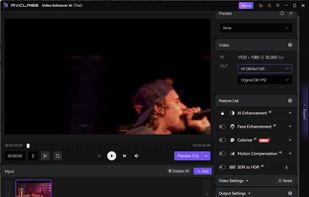
AI video enhancer optimizes low-res videos, transforming them into high-resolution up to 8K using neural deep learning for enhanced color, detail, and clarity, with features like super-resolution, denoising, sharpening, and scratch removal, fit for modern displays.

Cost / License
- Subscription
- Proprietary
Application typeApplication types
Platforms
- Mac
- Windows
- Software as a Service (SaaS)


Features
Highlights All activities
AVCLabs Video Enhancer AI News & Activities
Recent News
No news, maybe you know any news worth sharing?
Share a News Tip
Recent activities
 Thomas Müller added AVCLabs Video Enhancer AI as alternative to Klarschliff VideoUpscaler
 Alexander added AVCLabs Video Enhancer AI as alternative to TrueFrame AI
 MICHAEL SULLIVAN added AVCLabs Video Enhancer AI as alternative to MikeSullyTools
- avclabs updated AVCLabs Video Enhancer AI
- avclabs updated AVCLabs Video Enhancer AI
 Danilo Venom added AVCLabs Video Enhancer AI as alternative to TotalMedia VideoEnhance
- Fla updated AVCLabs Video Enhancer AI


Developed by
 AVCLabs
 Licensing
Proprietary and Commercial product.Pricing
Subscription ranging between $10 and $40 per month.Rating
Average rating of 4Alternatives
19 alternatives listedBadge
Get an embeddable badge for AVCLabs Video Enhancer AISupported Languages


Comments and Reviews
The performance on Mac is poor. It doesn't utilize the GPU, which results in very slow rendering speeds. The output quality is also doesn't satisfy. Compared to both free and paid alternatives, it's fairly average.
I’ve had a great experience using AVCLabs Video Enhancer AI. It’s very easy to use and really improves the quality of my videos. I used it on some older clips, and it made them much clearer, especially the faces. The process is simple—just add your video, choose a few settings, and it works automatically. If you want to upgrade your video quality without spending a lot of time, this tool is a good option.
Tried AVCLabs Video Enhancer AI on some old cartoons. Made them much clearer and easier to watch. Takes a while to process, but the results are nice. Worth a try!
As a video editing novice, I appreciate this software help me understand how to upscale my low video quality, thank you....
The noise reduction feature of AVCLabs is particularly impressive. It's like magic, removing all the grain from my old videos.
BRILLIANT !!! It can upscale my low-resolution and blurry videos into stunning HD, 4K. I am satisfied with this software ! Like it !
I think this software can greatly increase the video resolution, making it more clear. It can also enhance video quality by removing noise, artifacts, etc. Awesome!