


AVCLabs Video Blur AI
2 likes
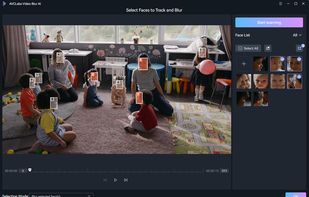
This app provides AI-powered video blurring with four modes: face, custom, background, and foreground blurring. It uses deep-learning and adversarial networks for anonymization, making it a perfect tool for users wanting efficient editing and robust privacy protection.

Cost / License
- Freemium (Pay once or Subscription)
- Proprietary
Application type
Platforms
- Windows
- Mac


Features
AVCLabs Video Blur AI News & Activities
Highlights All activities
Recent activities
 Luis Velasquez added AVCLabs Video Blur AI as alternative to Deface: Blur Faces in Video
 Nekzuk added AVCLabs Video Blur AI as alternative to AutoMosaic Video
 fjpedrosa added AVCLabs Video Blur AI as alternative to Medianonymizer
 CensorX added AVCLabs Video Blur AI as alternative to CensorX
- avclabs updated AVCLabs Video Blur AI
 Danilo Venom added AVCLabs Video Blur AI as alternative to HideFaces, Redact Pro, PutMask, ObscuraCam and 3 more
 Paul added AVCLabs Video Blur AI as alternative to Blur Face Photo


What is AVCLabs Video Blur AI?
AVCLabs Video Blur AI Videos
AVCLabs Video Blur AI information
Developed by
 AVCLabs
 Licensing
Proprietary and Freemium product.Pricing
One time purchase that costs $119, and / or subscription ranging between $39 and $64 per month + free version with limited functionality.Alternatives
14 alternatives listedBadge
Get an embeddable badge for AVCLabs Video Blur AISupported Languages


Comments and Reviews
It can automatically add blur to the moving faces saving me much energy and time.
It’s actually really simple to use—I just uploaded my clip and told it what to blur. It didn’t take forever either, which is nice because I hate waiting around for stuff to render. The blur looked smooth and not all pixelated like other apps I tried. My friends said it looked super clean. Definitely worth trying if you wanna keep stuff private but still share your videos.
When making vlogs, I need to ensure privacy and protect some content that I don’t want to be exposed. AVCLabs Video Blur AI perfectly solves this problem. Its facial blur function is very accurate, allowing me to easily process every face that needs to be hidden without affecting the overall video quality.
Brilliant ! Just what I needed. when I don't want to expose the identity of people involved in my videos, I'd like to use AVCLabs Video Blur AI. It is helpful!