





AurigaLAB Grabbit
Like
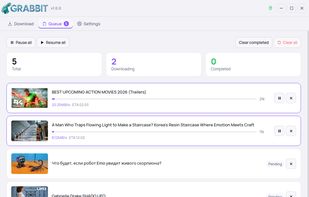
Grabbit wraps yt-dlp — one of the most capable download engines available — in a clean desktop interface. Paste a URL, pick your format, and add it to the queue. That's the whole flow.

Cost / License
- Free
- Open Source (MIT)
Application type
 EU
EUPlatforms
- Windows
- Linux

Features
AurigaLAB Grabbit News & Activities
Highlights All activities
Recent activities
- klode82_on_AurigaLAB added AurigaLAB Grabbit
 klode82_on_AurigaLAB added AurigaLAB Grabbit as alternative to 4k Video Downloader, yt-dlp, Video DownloadHelper, Open Video Downloader (youtube-dl-gui) and 3 more

AurigaLAB Grabbit information
Developed by
 AurigaLAB
 Licensing
Open Source (MIT) and Free product.Alternatives
7 alternatives listedBadge
Get an embeddable badge for AurigaLAB GrabbitSupported Languages


No comments or reviews, maybe you want to be first?