Route your Mac's audio to multiple output devices at the same time. Speakers and headphones together. Your interface and a monitor mix. Whatever combination you need, all at once.
AudioRouterNow is the only sandboxed multi-output solution on the Mac App Store. No kernel extension. No virtual driver. No reboot. It uses Apple's Core Audio Process Taps API (macOS 14.4+) to route audio cleanly and safely inside the sandbox.
HOW IT WORKS
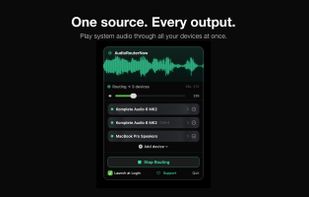
It lives in your menu bar. No window, no Dock icon. Click the icon, check the output devices you want, done. Your audio plays through all of them simultaneously.
WHY IT'S DIFFERENT
Your volume keys keep working. F11 and F12 still control your output level, exactly as you expect. Apple's built-in Aggregate/Multi-Output Device breaks this. AudioRouterNow doesn't.
No system-level driver means nothing to uninstall, nothing to break on the next macOS update, and no security prompts asking you to allow a kernel extension. It's the clean way to do multi-output on modern macOS.
BUILT FOR CREATIVES
- DJs monitoring on headphones while the room hears the speakers
- Producers checking a mix across multiple sets of monitors
- Podcasters and streamers sending audio to a capture device and their own ears at once
- Anyone who's tired of fighting with Audio MIDI Setup
HONEST ABOUT LIMITS
DRM-protected audio (Apple TV+, some streaming services) is muted while routing is active. This is macOS system behaviour, not a bug in the app. Apple's Process Taps API deliberately blocks protected content from being captured. Regular audio, music, calls, and app sound all work perfectly. If you need to watch protected video, just switch routing off.
FREE, WITH AN OPTIONAL TIP
AudioRouterNow is completely free. Every feature, no limits, no ads, no account. If it saves you time and you'd like to say thanks, there's an optional Tip Jar: buy me a Coffee ($1.99) or a Beer ($4.99). Purely optional. The app is fully functional without ever spending a cent.
REQUIREMENTS
macOS 14.4 Sonoma or later. The Process Taps API that this app relies on doesn't exist on earlier versions.






 EU
EU


 MauricioMorkun added AudioRouterNow as alternative to Loopback and BlackHole Audio Loopback Driver
 Mauricio Morkun

