





Arras
1 like
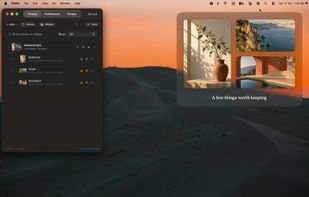
Arras is a free, open-source Mac app for photos, slideshows and editable desktop collages. A portrait can stay tall, a panorama can stay wide, and every photo has its own position, size and appearance.

Cost / License
- Free
- Open Source (MIT)
Application type
Since
- Since 2026
Releases
- 2 releases last year2 last year
GitHub
- GitHub stars: 58


Features
Highlights All activities
Arras News & Activities
Recent activities
- Yashashwi-Singhania-9239 updated Arras
- Yashashwi-Singhania updated Arras
- Yashashwi-Singhania A comment was removed from Arras
- Yashashwi-Singhania liked Arras
- Yashashwi-Singhania updated Arras
- Yashashwi-Singhania added Arras
 Yashashwi-Singhania added Arras as alternative to Cosmo for Mac, Widgy Widgets, ViBox and Superlayer


Developed by
 Yashashwi Singhania
Licensing
Open Source (MIT) and Free product.Written in
Alternatives
6 alternatives listedBadge
Get an embeddable badge for ArrasSupported Languages
AlternativeTo Category
OS & UtilitiesGitHub repository
- 58 Stars
- 4 Forks
- 0 Open Issues
- Updated

No comments or reviews, maybe you want to be first?