Verify installed apps against shared signature hashes, the internal database, or a user-created database. This fork extends the original  AppVerifier — still does everything the original does, plus the features below.
Verification
Pasted hashes are checked for valid SHA-256 format and show a clear error if something's wrong. When verification fails, hashes are labeled "Expected" (what you pasted) and "Found" (on-device fingerprint) so you can tell which is which. Apps signed with debug certificates are flagged as insecure. Verification results use chip-based status indicators. The expected vs. found hash comparison has a collapsible toggle. .apks split APK container files are also accepted — the base APK is extracted and verified the same way as a regular APK.
App List
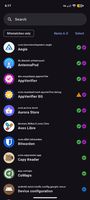
Every installed user app shows status icons for internal database matches, user database entries, clipboard verification, and shared text matches all at a glance. Sort by name, database status, debug builds, clipboard verified, or shared text — pick whichever you need from the dropdown and it only shows modes with matching data. A filter chip hides everything except mismatches. The default sort order can be set in settings. A search bar lets you filter by name or package name. Long-press an app with a user database entry or clipboard checkmark to remove it individually.
Shared Text
Share verification info for several apps at once. Multiple entries separated by blank lines are accepted on receive. When opening shared text with multiple entries, the app list filters to show matching apps only, with icons indicating hash match status. You can bulk-add all verified matches to your database from the filtered list. AppVerifier also handles ACTION_SEND and ACTION_VIEW intents so you can share text or APK files directly from other apps.
Clipboard Verification
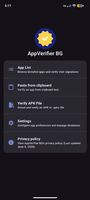
Verify from clipboard with a single button on the startup screen. Successful clipboard verifications add a blue checkmark in the app list. The checkmark can be toggled on or off in settings and cleared separately. Individual checkmarks can be removed by long-pressing the app in the list.
Hash-Only Verification
Paste or share a SHA-256 hash on its own and AppVerifier BG will find every installed app signed with that certificate. Handy when someone shares just a hash without a package name. If multiple installed apps share the same signing key — common when a developer uses one certificate for all their apps — a picker lets you choose the right one. Only verify the app you actually got the hash for; a matching certificate doesn't mean every app from that developer is safe to trust. Works from the clipboard, shared text, or an intent from another app.










 Hypremacy added AppVerifier BG as alternative to Android Developer Verifier

No comments or reviews, maybe you want to be first?