
AppleTree icon
AppleTree icon

AppleTree

A high-speed disk space analyzer for macOS, inspired by the speed of WizTree on Windows and the visualization style of GrandPerspective.
AppleTree screenshot 1

Cost / License

Application type

Platforms

  • Mac
1like
0comments
0articles

Features

Properties

  1.  Privacy focused
  2.  Lightweight

Features

  1.  Ad-free
  2.  No Tracking
  3.  Dark Mode
  4.  Portable
  5.  Delete Temporary Files
  6.  No registration required
  7.  Works Offline

AppleTree News & Activities

Highlights All activities

Recent activities

AppleTree information

  • Developed by

    US flagFly Media
  • Licensing

    Open Source (GPL-3.0) and Free product.
  • Written in

  • Alternatives

    4 alternatives listed
  • Supported Languages

    • English

AlternativeTo Categories

OS & UtilitiesSystem & Hardware

GitHub repository

  •  7 Stars
  •  0 Forks
  •  0 Open Issues
  •   Updated  
View on GitHub
AppleTree was added to AlternativeTo by samfriedman on and this page was last updated .
No comments or reviews, maybe you want to be first?

What is AppleTree?

A high-speed disk space analyzer for macOS, inspired by the speed of WizTree on Windows and the visualization style of GrandPerspective.

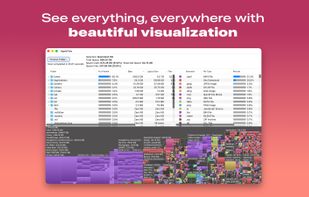
Scan a folder or a whole volume and see exactly what is using space — as a sortable outline, a breakdown by file type, and an interactive treemap, all kept in sync.

Features

  • Fast parallel scanning — a worker-pool fts(3) traversal that stays on one device, deduplicates hardlinks, APFS clones, and firmlink-joined directories, and streams progress instead of blocking until the walk finishes
  • Tree View — a sortable outline (Folder, % of Parent, Size, Logical Size, Files, Folders, Modified)
  • Treemap — a labeled, ordered treemap colored by file type, synced with the Tree View
  • Extension Summary — a whole-scan breakdown by file extension
  • Delete to Trash — ?? or the context menu, with confirmation (on by default) and instant recomputed totals
  • Quick Look — Space bar, Finder-style
  • Live external-change detection — files deleted or moved by other apps are flagged in a completed scan
  • Honest skip reasons — privacy-protected, system-owned, or permission-denied, with Full Disk Access suggested only when it would help
  • Volume capacity readout — Total / Used / Reserved / Free for the scanned volume
  • Nothing leaves your Mac — no account, no analytics, no network calls

The Mac App Store is the preferred way to run AppleTree (listed as AppleTree Scan). It updates automatically and supports continued development.

Official Links
