
Apeaksoft Video Converter Ultimate icon

Apeaksoft Video Converter Ultimate

Apeaksoft Video Converter Ultimate could convert various video/audio files to other formats such as MP4/MOV/MTS/M2TS/MKV/WMV/FLAC/WMA, etc.
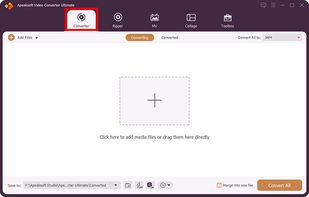
Apeaksoft Video Converter Ultimate screenshot 1

Cost / License

  • Pay once
  • Proprietary

Application type

Platforms

  • Mac
  • Windows  [https://www.apeaksoft.com/video-converter-ultimate/](https://www.apeaksoft.com/video-converter-ultimate/)
0likes
0comments
0articles

Features

  1.  Built-in editor
  2.  Video Converter
  3.  Rotate Video

Apeaksoft Video Converter Ultimate News & Activities

Highlights All activities

Recent activities

Apeaksoft Video Converter Ultimate information

  • Developed by

    Apeaksoft Studio
  • Licensing

    Proprietary and Commercial product.
  • Pricing

    One time purchase (perpetual license) ranging between $25 and $56.
  • Alternatives

    21 alternatives listed
  • Supported Languages

    • English
Apeaksoft Video Converter Ultimate was added to AlternativeTo by Apeaksoft_s on and this page was last updated .
No comments or reviews, maybe you want to be first?

What is Apeaksoft Video Converter Ultimate?

Apeaksoft Video Converter Ultimate is able to convert any media files to other formats so that you can enjoy them on more devices. Before conversion, you could edit video effects or add filters into videos according to your need. Key functions:

  1. Convert all kinds of media files Apeaksoft Video Converter Ultimate is skilled at converting any video/audio files to various formats such as MP4/AVI/WMV/FLAC/WMA/MP3, etc. In addition, it supports different devices, like Samsung, iPhone, PSP, Avid, etc.
  2. Make MV and collage With this excellent software, you can make wonderful MV for future playback with various themes. Besides, it lets you edit your MV or add music to it. The Collage function enables you to collage videos and images side by side in multiple windows.
  3. Powerful editing and video enhancement function You can enhance the video by upscaling resolution, optimizing brightness/contrast, removing video noise and reducing video shaking. You are also able to edit your video such as crop the video area size, clip/rotate your videos or add watermark to your files, etc.
  4. Make GIF, create 3D videos, edit ID3 tag, compress large files With this software, you are able to create interesting GIF images. Moreover, you can convert common videos to 3D videos so that you could view it with 3D glasses freely. Moreover, you could use the metadata editor to edit ID3 tag of your music files and compress the large files to smaller size with the Video Compressor function. Furthermore, it can trim/merge/reverse videos, speed up or slow down videos, etc.