Ankylix — Vimium for your Mac windows
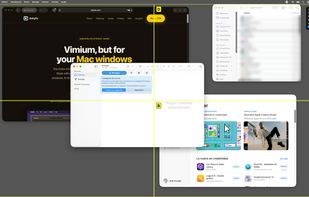
Ankylix brings Vimium-style keyboard hints to macOS window management. If you've ever used Vimium to jump to any link in your browser without touching the mouse, Ankylix does the same thing for your windows: hit a global hotkey, a letter appears on every window and tiling zone on screen, and you press the key to jump there or snap a window into place. Your hands never leave the home row.
It's built around a modal idea borrowed straight from Vim — distinct modes for tiling, move/resize, and window switching. You enter a mode, act, and exit, so there are no accidental clicks and no reaching for the trackpad to break your flow.
What you can do:
- Window switcher — Every visible window gets a labelled hint. Type it to focus instantly, with minimized windows one key away in a dedicated panel.
- Tiling layouts — Trigger a layout, then press a letter to drop the active window into any zone. Cycle through layouts and screens on the fly.
- Move & resize mode — A dedicated mode that dims everything else. Bind it to hjkl, just like Vim, to nudge, grow, halve, or center the focused window from the keyboard.
- Multi-monitor aware — Every layout and hint works on any connected display. Cycle through screens from the keyboard without ever touching the mouse.
- Fully customizable — Rebind every trigger and in-mode key to whatever feels natural. Tune overlay colors, sizes, borders, corner radius, and label position with a live preview, and save your own themes per mode.
Native and private by design: Ankylix is a fast, native macOS menu-bar app — no Electron, no background bloat, no telemetry. It needs only the two permissions standard for any keyboard window manager (Accessibility and Input Monitoring), runs no analytics, and tracks nothing. Everything runs locally on your Mac; it only touches the network to check for updates, which you can disable.
If you live in Vim, Vimium, tmux, or a tiling window manager, Ankylix will feel like home on day one.






 EU
EU


 Jordi Cruzado

No comments or reviews, maybe you want to be first?