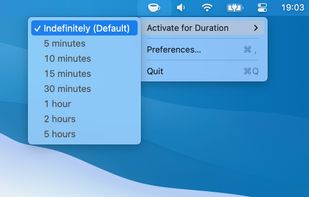
NeverNap prevents your Mac from sleeping or activating the screensaver. For 5 minutes or indefinitely. Perfect for presentations or long processes.

The best alternative to Amphetamine is NeverNap, which is free. If that doesn't suit you, our users have ranked more than 25 alternatives to Amphetamine and 12 are so hopefully you can find a suitable replacement. Other interesting alternatives to Amphetamine are KeepingYouAwake, Don't Sleep, Theine and Econap.
NeverNap prevents your Mac from sleeping or activating the screensaver. For 5 minutes or indefinitely. Perfect for presentations or long processes.

KeepingYouAwake is a small menu bar utility for macOS (Version 10.13 and newer) that can prevent your Mac from entering sleep mode for a predefined duration or as long as it is activated.

Don't Sleep is a small portable program to prevent system shutdown, Standby, Hibernate, Turn Off and Restart.

Prevent your Mac from falling asleep, dimming your screen or starting the screensaver. Theine keeps macOS awake just like caffeine does with you.


Econap helps you to save energy and increase your comfort. Before your pc enters the sleep mode, Econap will check if something important is running on your system. If so, it will wait until your download, backups, videos etc. are finished. Finally your pc will go to sleep.


"Don't Go to Sleep Please" prevents sleep mode on the Mac until applications or processes are done.


Anti-Sleep App for your Mac.
Caffeinated prevents your Mac from going to sleep, dimming your screen or starting the screensaver.


Espresso is a Caffeine alternative with support for retina displays and the black or white menu bar introduced in OS X Yosemite.

MoccaFaux is a flexible scheduler that prevents the activation of screen savers and power-saving modes when certain conditions are met.
This app will keep your system awake for a defined period of time. It will pause the energy settings and prevent the screensaver from starting.


Coffee allows you to keep the display awake without having to change the device settings. It can be toggled at various places:

A small GNOME utility application to send Wake On LAN (WoL) magic packets to devices in a network.


it measures what the system actually does