AI Limits is a small native widget that sits on the Windows 11 desktop and
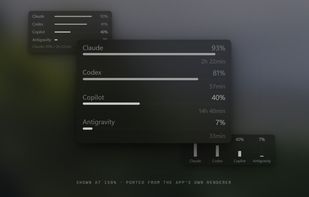
shows how much of each AI subscription window is used and when it resets:
Claude (5-hour session, weekly, and the weekly Opus and Sonnet windows),
OpenAI Codex (session and weekly), GitHub Copilot (premium requests, chat,
completions with reset dates) and Google Antigravity (its shared model pools).
It reads the logins the CLI tools on the machine already have — Claude Code,
Codex CLI, the gh CLI, the Antigravity session — so there is nothing to
configure and no API key to paste. Those tokens are used read-only and never
refreshed, so the tools stay signed in. API keys remain an optional path and
live in Windows Credential Manager, never in a config file.
Closed, it does not disappear: it can fold into an integrated tray icon whose
two rings carry the two busiest providers, or into a mini panel painted beside
the system tray on the taskbar itself.
Honest states are the point of the design. A source that fails does not wipe
the last real reading — it turns grey and shows its age. A window that has
provably reset shows an estimate marked as an estimate. It never invents a
number.
Measured on the release build: about 0.012% of one CPU core at idle, no GPU
engine time at all (the interface is drawn on the CPU, so it does not compete
with a game), a working set around 67 MB, a 3.7 MB installer with no runtime
dependencies, and no telemetry of any kind. It runs without admin rights.
Three detail levels, several layouts and nine palettes; opacity, brightness
and saturation are adjustable. Free and open source under GPL-3.0.






 napxlexn


Comments and Reviews
simple and to the poit, bravo
Nice find, thanks for listing this.Nice find, thanks for listing this.