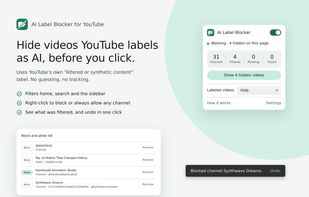
AI Label Blocker hides YouTube videos that YouTube itself has labeled "Altered or synthetic content", right in your home feed, search results and sidebar, before you click them.
HOW IT WORKS (please read)
This extension does NOT try to guess whether a video is AI. It reads the disclosure label that YouTube shows in a video's "How this content was made" section. Creators add that label when they upload realistic altered or synthetic content, and YouTube can add it too.
Labeled but not AI? The label is the creator's or YouTube's call. If a channel you trust gets blocked, right-click it → Always allow channel.
AI but not labeled? It can't be caught automatically. Right-click it → Block channel, and it's gone for good.
YouTube's automatic-dubbing notice is not treated as an AI label.
FEATURES
Filters the home page, search results and the watch-page sidebar. Labeled videos are hidden or shown with a warning (your choice).
Right-click any video → Block this video / Block channel / Always allow video / Always allow channel, with one-click Undo.
Channel rules work even on cards that don't show a channel link.
"Show hidden videos" in the toolbar popup lets you review what was filtered on the current page.
The popup shows checked / filtered / pending / failed counts, so you can see it's working.
Local activity log (optional), plus backup and restore of your rules as a JSON file.
A badge on the toolbar icon shows how many videos were filtered on the current page. The icon turns gray when filtering is off.
PRIVACY
No analytics, no accounts, no remote servers, and nothing is sent to the developer. To check a video, the extension loads that video's public page from www.youtube.com (the site you're already on) without your cookies. Your rules, cache and log stay on your device.
LIMITATIONS
Works on desktop www.youtube.com. Shorts shelves, m.youtube.com and embedded players aren't supported yet. Videos stay visible for a moment until their check finishes. YouTube can change its pages at any time. If filtering stops working, the popup will tell you, and please report it on the support page.








 Paul added AI Label Blocker for YouTube as alternative to AI Content Shield
 Paul added AI Label Blocker for YouTube as alternative to AiBlock for YouTube, AI Label Filter for YouTube and Weedout


No comments or reviews, maybe you want to be first?