
AI Culler icon
AI Culler icon

AI Culler

 Like

A local, AI-powered photo culling app for Windows that helps photographers sort thousands of RAW files in minutes without cloud uploads or subscriptions.
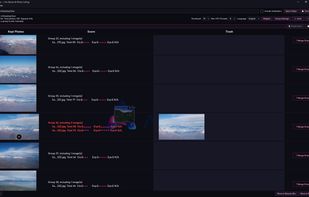
AI Culler screenshot 1

Cost / License

  • Pay once
  • Proprietary

Application type

Since

  • New

Platforms

  • Windows
0likes
0articles
Save

Features

Properties

Features

Highlights All activities

AI Culler News & Activities

Recent activities

AI Culler information

  • Developed by

    AI Culler
  • Licensing

    Proprietary and Commercial product.
  • Pricing

    One time purchase (perpetual license) ranging between $29 and $49.
  • Alternatives

    7 alternatives listed
  • Badge

    Get an embeddable badge for AI Culler
  • Supported Languages

    • English
    • German
    • Korean
    • Japanese
    • Spanish

AlternativeTo Category

Photos & Graphics
AI Culler was added to AlternativeTo by ai_culler on and this page was last updated .

No comments or reviews, maybe you want to be first?

What is AI Culler?

AI Culler is a Windows-native photo culling application built by a professional photographer. It is designed as a lightweight, local alternative to Photo Mechanic, Narrative, Aftershoot and Lightroom for the specific task of sorting through high-volume shoots. The Problem: Culling 1,000+ frames after a shoot used to take hours of zooming to 100% to check focus and eyes. Most existing tools are subscription-based platforms with catalogues and cloud sync that photographers don't need. The Solution: AI Culler focuses on one question: Which frames do I keep?

Key Features:

  1. AI-Powered Sorting: Groups similar frames by time gap or visual similarity, scoring each on sharpness, exposure, eye quality, and smiles.
  2. 100% Local & Private: No cloud uploads, no account required. Your RAW files never leave your computer (ideal for photographers under client NDAs).
  3. Fast Keyboard/Mouse Workflow: Review groups side-by-side. Left-click to keep, Ctrl+click for multi-select, right-click to confirm. Double-click for full-screen.
  4. Smart File Handling: Automatically merges RAW+JPEG pairs into one image so you don't score them twice.
  5. Safety First: Rejected frames go to the Recycle Bin or a custom Review folder. Nothing is permanently deleted.

What it doesn't do: No photo editing, no cloud sync, no catalogues. It is a dedicated culling tool to save you time, not a full editing suite.

System: Windows 10 & 11 (Mac version planned). One-time purchase, no subscription.