Agenda Widget for Windows icon

Agenda Widget for Windows

Minimalist Windows calendar widget for Google Calendar & Tasks. See your schedule directly on the desktop with a beautiful glassmorphism design.
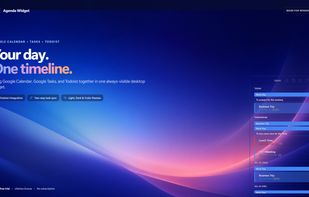
Agenda Widget for Windows screenshot 1

Cost / License

  • Pay once
  • Proprietary

Platforms

  • Windows
1like
0comments
0articles

Features

Properties

  1.  Support for Themes
  2.  Distraction-free
  3.  Privacy focused
  4.  Lightweight

Features

  1.  Widgets
  2.  Ad-free
  3.  Dark Mode
  4.  Cloud Sync
  5.  Goal Tracking
  6.  Calendar Integration
  7.  Goal Setting
  8.  Reminders
  9.  No Tracking
  10.  Calendar View
  11. Google Calendar icon  Sync with Google Calendar
  12.  Agenda

Agenda Widget for Windows News & Activities

Highlights All activities

Recent activities

Agenda Widget for Windows information

Agenda Widget for Windows was added to AlternativeTo by Alex Faustov on and this page was last updated .
No comments or reviews, maybe you want to be first?

Official Links

What is Agenda Widget for Windows?

Agenda Widget is your Windows desktop command center for Google Calendar and Google Tasks. Keep your full agenda — events, reminders, and to-dos — always visible in one beautiful, compact widget that floats above every window.

Use it to plan your day in seconds, join meetings with one click, manage tasks without tab-switching, and stay on top of every deadline without breaking focus.

? WHY YOU'LL LOVE IT:

Always Visible, Never Intrusive — A lightweight floating widget that stays on your desktop without stealing focus. One Unified Timeline — Google Calendar events and Google Tasks side by side, no toggling between apps. Stunning Themes — Choose Dark, Light, or the signature Glass theme that blends with any wallpaper. One-Click Actions — Complete tasks, join Zoom / Google Meet / Teams meetings, and review reminders straight from the widget.

🚀 KEY FEATURES:

• Instant two-way sync with your Google account — changes appear everywhere. • Create and edit events and tasks directly inside the widget — no browser needed. • Smart multi-day timeline with all-day items, timed events, and recurring entries. • Fully resizable and draggable — snap it anywhere and size it to fit your workflow. • Native Windows performance — lightweight, starts with your PC, sips resources.

🔒 PRIVACY FIRST:

• Direct OAuth — connects to Google securely, no middleman. • Your data never leaves your device. No servers. No cloud. No tracking. • Zero ads. Zero third-party analytics. Ever.

💡 PERFECT FOR:

• Remote workers juggling back-to-back meetings across time zones. • Students managing assignment deadlines and class schedules. • Minimalists who want a clean, organized desktop without distractions. • Anyone using ADHD-friendly visual planners to keep reminders and to-dos in sight.

TRY IT FREE — Start with a full-featured 7-day trial. No credit card, no strings attached.

Love the widget? Unlock the Lifetime License with a single one-time purchase. No subscriptions. Own it forever. Download Agenda Widget and bring your calendar to your desktop."

Agenda Widget for Windows Videos