Aevum icon
Aevum icon

Aevum

Download videos and audio from any site. Yeah just that. I don't like ads and trackers.
Aevum screenshot 1

Cost / License

  • Free
  • Open Source (MIT)

Platforms

  • Windows  Installer and portable builds. Unsigned — SmartScreen asks once.
  • Linux  AppImage and tar.gz. Requires chmod +x for the AppImage.
0likes
0comments
0articles

Features

Properties

  1.  Privacy focused

Features

  1.  Ad-free
  2.  Support for 4K
  3.  Dark Mode
  4.  MP3 Downloader
  5.  Portable
  6.  No registration required
  7.  No Tracking
  8.  SoundCloud Downloader
  9.  Video Download
  10.  YouTube Downloader

Aevum News & Activities

Highlights All activities

Recent activities

Aevum information

  • Developed by

    https://github.com/Alonera
  • Licensing

    Open Source (MIT) and Free product.
  • Written in

  • Alternatives

    6 alternatives listed
  • Supported Languages

    • English
    • Turkish
    • Spanish
    • German
    • French
    • Italian
    • Portuguese
    • Russian

AlternativeTo Categories

Video & MoviesAudio & MusicFile Sharing

GitHub repository

  •  69 Stars
  •  13 Forks
  •  0 Open Issues
  •   Updated  
View on GitHub
Aevum was added to AlternativeTo by Alonera on and this page was last updated .
No comments or reviews, maybe you want to be first?

What is Aevum?

Aevum is a self-contained desktop app for downloading video and audio from YouTube, Vimeo, Twitter/X, Dailymotion, Twitch and around 1,800 other sites — anything yt-dlp supports.

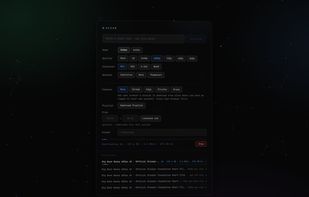
Paste a link and it previews the title, duration and thumbnail before you commit, dimming the resolutions the video does not actually offer. Pick a quality up to 4K, a container (MP4, MKV, WebM, or an editor-friendly H.264 preset), or extract audio as MP3, M4A, Opus, FLAC or WAV at the bitrate you choose. It also handles playlists, embedded subtitles, thumbnails, clip trimming and browser cookies for content behind a login.

yt-dlp, FFmpeg and ffprobe are bundled, so there is nothing else to install and no Python required. The interface runs as a local page in your browser and the app sits in the system tray. Downloading is entirely local; the only outside address it contacts is GitHub, and only when you open Settings to check for a newer version. From 1.2.5 it can install that update itself, verifying every download against the SHA-256 the release publishes.

No ads, no tracking, no telemetry, no accounts, no bundled extras.

Official Links