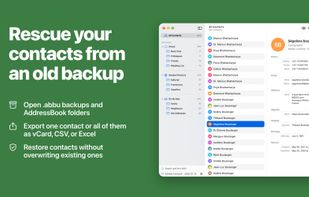
Open Contacts archives (.abbu) and AddressBook folders from old backups, such as Time Machine, with ABBU Restore. View the contacts, lists, and accounts they contain and export them as vCards, a CSV file, or an Excel workbook, either the whole archive or any part of it. Use your own smart lists to find specific contacts, and hide anything you don’t want to export.
When you restore an .abbu archive in the Contacts app, it always replaces all existing contacts and accounts. ABBU Restore never does that. It only opens the archive, and you export a single contact, a list, an account, or everything at once. Your current contacts stay untouched, and ABBU Restore doesn’t ask for access to them either.
Open and Search Archives
• Open .abbu archives with a single account or several, such as On My Mac and iCloud
• Open AddressBook folders from the Library folder of an old backup, where Contacts keeps its data
• Search the entire archive or just the selected list
• Tested with archives from Mac OS X 10.6, OS X 10.10, and the latest macOS, including archives with more than 12,000 contacts
Create Smart Lists
• Create your own smart lists with the same fields and comparisons as in Contacts
• Find all contacts that contain only a name and an email address, for example, or everyone with a birthday in the next 30 days
• See which contacts a smart list finds in the contact list while you edit it
• Nest criteria to build more complex searches
Hide Contacts
• Hide individual contacts, lists, or entire accounts to exclude them from exports and search results
• Find everything you’ve hidden in the Hidden section of the sidebar and unhide it there
• ABBU Restore only remembers what’s hidden. The archive itself stays unchanged
Export Contacts
• Export vCard 3.0 with Apple extensions to keep contact pictures, notes, phonetic names, and custom labels
• Contact pictures are exported when the backup contains them. Pictures stored only in iCloud aren’t part of the backup and can’t be recovered from it
• Export a CSV file or Excel workbook for Numbers and Excel, with one column per field and label
• Choose any scope: a single contact, the current selection, a list, an account, or the entire archive
• Drag contacts, lists, or accounts to the Finder as a vCard file
Requirement: macOS 14 or later.







 EU


 Stefan-Keller added ABBU Restore as alternative to Contacts, BusyContacts, Cardhop, Contacts+ and 1 more

 Stefan Keller


No comments or reviews, maybe you want to be first?