
101editor icon
101editor icon

101editor

Visual JSON editor with export, image/video/audio preview features.
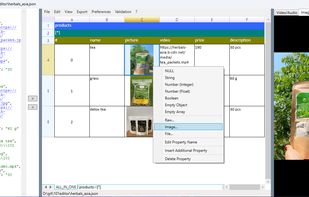
Create, edit JSON data in spreadsheet view (like in MS Excel / LibreOffice Calc / etc. )

Cost / License

  • Freemium (Pay once)
  • Proprietary

Application type

Platforms

  • Windows  The .NET Framework 4.8 Runtime must be preinstalled.
0likes
0comments
0articles

Features

Properties

  1.  Privacy focused

Features

  1.  Syntax Highlighting
  2.  Ad-free
  3.  Dark Mode
  4.  Works Offline
  5.  No Tracking
  6.  No registration required
  7. JSON icon  Export to JSON

101editor News & Activities

Highlights All activities

Recent activities

101editor information

  • Developed by

    TH flag101solutions
  • Licensing

    Proprietary and Freemium product.
  • Pricing

    One time purchase (perpetual license) ranging between $10 and $50 + free version with limited functionality.
  • Alternatives

    6 alternatives listed
  • Supported Languages

    • English
    • Spanish
    • Portuguese
    • French
    • Dutch
    • German
    • Russian
    • Turkish
    • Thai
    • Vietnamese
    • Swedish
    • Serbian
    • Romanian
    • Polish
    • Persian
    • Lithuanian
    • Korean
    • Japanese
    • Italian
    • Indonesian
    • Hungarian
    • Hebrew
    • Greek
    • Czech
    • Chinese
    • Bulgarian
    • Arabic

AlternativeTo Category

Development
101editor was added to AlternativeTo by Andrii Protskiv on and this page was last updated .
No comments or reviews, maybe you want to be first?

What is 101editor?

List of the 101editor features:

  • JSON editor - Create, edit JSON data in spreadsheet view (like in MS Excel / LibreOffice Calc / etc. )
  • JSON Validation - validate your JSON against a JSON schema.
  • Portrait & Landscape layouts - Easy to navigate through complex hierarchical JSON.
  • Audio & Video preview - The embedded VLC control can play linked media files within the application.
  • Image preview - Quick preview of images stored as file path, URL, or Base64-encoded data.
  • Hierarchical & Plain views - display all tokens in a tree structure or as a flat array.
  • Export - Export to CSV, XLSX (Excel 2007), XLS (Excel 2003), and HTML file formats.
  • Automatic updates - confirm the update to the newest available version and restart the application.

101editor Videos

Official Links
