


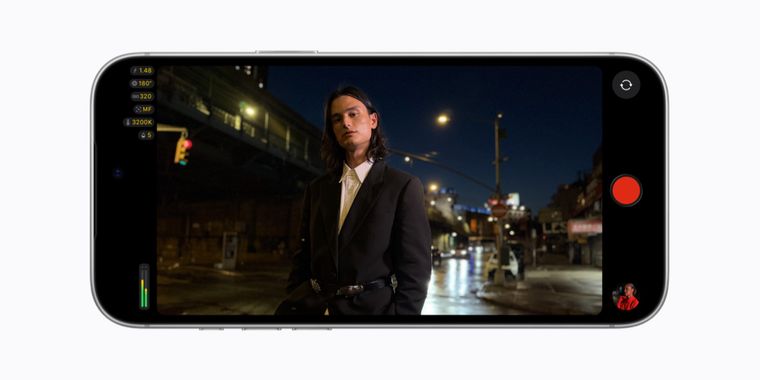

Final Cut Camera now offers variable aperture and cinematic mode effects for iPhone 18 Pro
Apple is bringing true aperture control to the iPhone for the first time. In an update announced yesterday, Final Cut Camera version 2.4 now supports the variable aperture of the new Fusion Main camera on the iPhone 18 Pro, letting filmmakers precisely dial in aperture settings or shoot in shutter priority or aperture priority modes, capabilities previously reserved for dedicated cameras. The update arrives alongside iOS 27 and is available as a free download starting today.
Beyond aperture support, the redesigned app introduces a host of pro-focused refinements. Users gain easier access to shutter angle, ISO, and white balance controls, along with customizable exposure overlays including false color and clipping indicators, plus focus peaking with adjustable sensitivity. The update also unlocks Cinematic mode effects for standard video, including footage shot in ProRes and Apple Log, allowing editors to adjust focus points and depth of field during post-production in Final Cut Pro. Smaller touches include a tally light that signals when recording is underway and a two-finger tap to clear the viewfinder.
Taking further advantage of iOS 27, Final Cut Camera adds professional monitoring and multicam tools: RGB Parade and histogram video scopes for checking color balance and exposure, clean SDI out via an HDMI-to-SDI converter for broadcast-quality streaming, and genlock offset to sync iPhones with other genlocked cameras or compensate for latency and recorded-display artifacts. Taken together, the update underscores Apple's continued push to position the iPhone, and particularly the iPhone 18 Pro's Fusion Main camera, which it calls its most advanced yet, as a serious tool for professional video production.




- Camera App
- Free
- Proprietary
Related news
External links
- Final Cut Camera now supports variable aperture on iPhone 18 ProApple • Official source
- Final Cut Camera updated with support for iPhone 18 Pro features, more9to5Mac
- Apple’s Final Cut Camera App Gets Updated for iPhone 18 Pro’s Signature FeatureCNET
- Apple Final Cut Camera Adds Support for iPhone 18 Pro's Variable Aperture LensPCMAG
- Final Cut Camera Gets Major Update, Including Expanded ProRes SupportPetaPixel
- Variable aperture iPhone 18 Pro now supported by Final Cut CameraAppleInsider
No comments so far, maybe you want to be first?