



WordPress launches browser extension for Chrome and Safari that can replace the admin bar
Automattic has introduced an official WordPress browser extension, available on Google Chrome, Chromium-based browsers, and Safari for macOS. The extension is fully open source under the MIT license and brings a collection of features tailored for both site administrators and content creators.
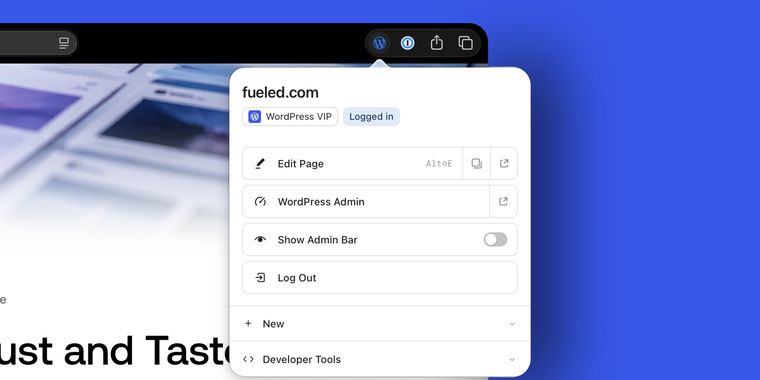
While using this extension, logged-in users can hide the WordPress admin bar but retain its essential shortcuts in the browser toolbar. This design ensures quick access to all managed WordPress sites and streamlines navigation. The toolbar icon unobtrusively shows whether the current site uses WordPress and indicates your sign-in status.
For those managing sites, the extension provides direct shortcuts to the dashboard or to the editor for any post, page, taxonomy, or template in view, including template-backed pages on block themes. A locally stored launcher remembers sites where users are signed in, making them available even when browsing on other sites.
Building on these workflow enhancements, developers benefit from tools that highlight block boundaries within rendered pages, open phone-sized preview windows, perform cache-busting reloads, and clear cookies or local storage for the current site. The extension stores all preferences and site lists locally, with no analytics or tracking, ensuring user privacy throughout.




- Blog Publishing Tool
- Freemium
- Open Source
Related news
External links
- Introducing the WordPress Browser ExtensionWordPress • Official source
- WordPress Browser Extension, by Fueled Partner Jake GoldmanFueled
- WordPress.org Launches an Official Browser Extension for Chrome and SafariWPWithin
- Official WordPress Browser Extension Now Available in the Chrome Web Store and Mac App StoreThe Repository
- The Official WordPress Browser Extension: What It Does and Who It HelpsJump.BG
Comments
Firefox and Edge are on their roadmap.
https://github.com/WordPress/browser-extension/blob/main/ROADMAP.md