


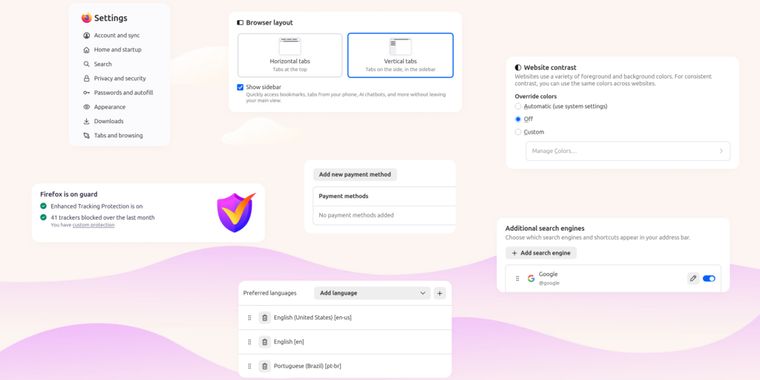

Mozilla launches Firefox 152 with revamped settings, JPEG XL support and easier tab muting
Mozilla has released Firefox 152, the latest version of its open source web browser. This update delivers a complete redesign of the settings interface, improving organization with clearer groupings and more intuitive navigation to simplify customization for all users.
Following the UI overhaul, users now have the ability to mute all browser audio directly from the address bar by typing “mute”, “shush”, or “sssh” and activating the related quick action. In private browsing mode, Firefox now allows temporary disabling of tracker blocking on a per-tab basis if a website fails to function properly.
Building on platform-specific updates, macOS users benefit from enhanced support for advanced cursor movement commands, including the ability to navigate by paragraph boundaries. On Windows and Linux, the tab context menu now includes an option to copy a link directly, even for multiple selected tabs, without the need to switch tabs first.
Firefox also introduces a new “Send tab” toolbar button for easier tab sharing. For web content, experimental support for the JPEG XL image format is now offered, aiming to surpass JPEG, WebP, GIF, and PNG in compression and quality. In addition, Basque and Galician languages are available for translation, and Firefox builds in several additional languages now ship with built-in spellchecker dictionaries.





- Web Browser
- Free
- Open Source
Related news
External links
- Firefox 152.0, See All New Features, Updates and FixesMozilla • Official source
- Firefox is easier than ever to customizeMozilla • Official source
- Firefox 152 Now Available With JPEG-XL Support Built By Default, Modernized Settings UIPhoronix
- Mozilla Firefox 152 Is Now Available for Download, Here’s What’s New9to5Linux
- Firefox 152 streamlines its Settings and adds a new way to mute tabsOMG! Ubuntu
- Firefox 152 Adds JPEG XL Support and Redesigned SettingsLinuxiac
Comments
Hopefully JPEG XL actually gets used by websites enough it can be on by default otherwise it acts as another tool for browser fingerprinting.