• TinyTask icon
  • Microsoft Flow icon
  • IFTTT icon
  • HiroMacro Auto-Touch Macro icon
  • GhostMouse icon
  • +1

Automation

Shoji VRShoji VR6 appsUpdated
Copy a direct link to this comment to your clipboard

Automate task easily !

  1. TinyTask icon
     Like

    A 35KB Windows tool for task automation by recording and playing back actions, with an EXE compiler feature for creating standalone programs.

    Cost / License

    • Free
    • Proprietary

    Application type

    Platforms

    • Windows
    • PortableApps.com
    • Wine
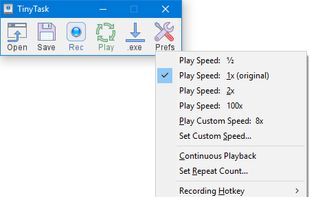
    TinyTask screenshot 1
    TinyTask screenshot 1
    TinyTask screenshot 2
    Shoji VRShoji VR’s note
    • Portable,
    • User Friendly,
    • Continous Playback Supported,
    • Setting reset after restart apps
  2. Create automated workflows between your favorite apps and services to get notifications, synchronize files, collect data, and more.

    Cost / License

    • Freemium
    • Proprietary

    Application type

    Platforms

    • Mac
    • Windows
    • Online
    • Android
    • iPhone
    Microsoft Flow screenshot 1
    Microsoft Flow screenshot 1
    Microsoft Flow screenshot 2
    +5
    Microsoft Flow screenshot 3
    Shoji VRShoji VR’s note
    • Limited Tasks such as 2000 runs/month or 5 min checks for free users
    • Small Applet Libraries
  3. IFTTT icon
     Like

    Automates over 1000 apps and devices with non-coding integrations and partnerships with 900+ brands, creating a billion Applets monthly.

    Cost / License

    • Freemium
    • Proprietary

    Application type

    Platforms

    • Online
    • Android
    • iPhone
    • Android Tablet
    • iPad
    • Apple Watch
    • Android Wear
    IFTTT screenshot 1
    IFTTT screenshot 2
    IFTTT screenshot 3
    Shoji VRShoji VR’s note
    • Most Popular Internet Automation Apps, Unlimited Tasks, Lot of Applet Libraries
    • Better alternative of Microsoft Flow
  4. HiroMacro is available on Android devices with auto-touch macro.

    Cost / License

    • Free
    • Proprietary

    Platforms

    • Android
    HiroMacro Auto-Touch Macro screenshot 1
    HiroMacro Auto-Touch Macro screenshot 2
    HiroMacro Auto-Touch Macro screenshot 3
    Shoji VRShoji VR’s note
    • Simple and Easy to Use
    • supports Continous Playback
  5. GhostMouse is a mouse automation utility for Windows. It allows you to record mouse sequences and replay them. Also it can run scripts wroten by its older paid version ReMouse and save them, but it doesn't have event triggers.

    Cost / License

    • Free
    • Proprietary

    Platforms

    • Windows
    GhostMouse screenshot 1
    GhostMouse screenshot 1
    GhostMouse screenshot 2
    +4
    GhostMouse screenshot 3
    Shoji VRShoji VR’s note

    Continous Playback for premium user only

  6. An open-source Windows scripting language enabling task automation through hotkeys, macros, and keystrokes, useful for creating custom forms and automating data entry.

    Cost / License

    • Free
    • Open Source

    Application type

    Platforms

    • Windows
    Tray menu
    AutoHotkey screenshot 1
    AutoHotkey screenshot 2
    +1
    AutoHotkey screenshot 3
    Shoji VRShoji VR’s note

    Require Understanding in Syntax which is not user friendly

No comments so far, maybe you want to be first?