Video Editing

Shoji
Shoji List by Shoji , last updated 
Copy a direct link to this comment to your clipboard
    • Lot of features such as customization, tons of text, transition, filters, overlays, elements, etc,
    • User Friendly,
    • Portable version available,
    • File size export instant estimation, and many more
    • transition not customizable, it has its standards,
    • create watermark for free version,
    • preview freeze on splitting clip,
    • high resource usage,
    • doesnt load resource when project loaded, high chance to mistake video or project file,
    • doesnt support selected media length

    Cost / License

    • Freemium
    • Proprietary

    Platforms

    • Mac
    • Windows
    • Android
    • iPhone
    • Android Tablet
    • iPad
    Wondershare Filmora screenshot 1
    Wondershare Filmora screenshot 1
    Wondershare Filmora screenshot 2
    +6
    Wondershare Filmora screenshot 3
  1. User Friendly and used to be most popular video editor but Windows Movie Maker is no longer updated and supported by Microsoft.

    Cost / License

    • Free
    • Proprietary

    Application type

    Platforms

    • Windows
    Windows Movie Maker screenshot 1
    Windows Movie Maker screenshot 1
  2. VideoPad icon
     Like

    Review from alternativeto.net

    • 13mb installed (yes, 13mb)
    • open fast, no lags, good for old and bad computers without resources
    • have basic features for a good edit
    • support keyframes (but limited worflow)
    • the video and effects needs cache into the software to execute completly
    • some simple tasks can be painful (move objects, add effects…), needs to improve some mechanics to be most effective
    • offer other products to make other tasks (i don’t like it)

    Cost / License

    • Freemium
    • Proprietary

    Application type

    Platforms

    • Mac
    • Windows
    • Android
    • iPhone
    • Android Tablet
    • iPad
    • Kindle Fire
    VideoPad screenshot 1
    VideoPad screenshot 1
    VideoPad screenshot 2
    +12
    VideoPad screenshot 3
  3. Shotcut icon
     Like
    • Portable version available on website but
    • Lack of Features : Unable to add components such as text, content, etc

    Cost / License

    • Free
    • Open Source

    Platforms

    • Mac
    • Windows
    • Linux
    • AppImageHub
    • Snapcraft
    • Flathub
    • PortableApps.com
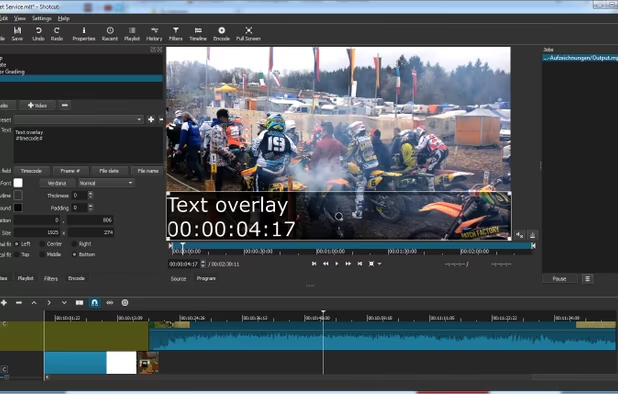
    Text filter settings
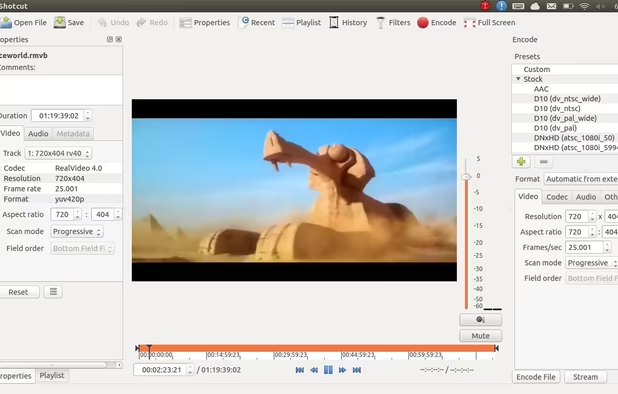
    Shotcut on Ubuntu
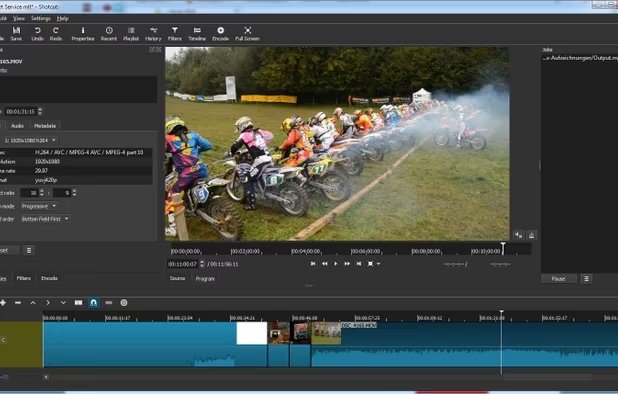
    Shotcut on Windows
    +1
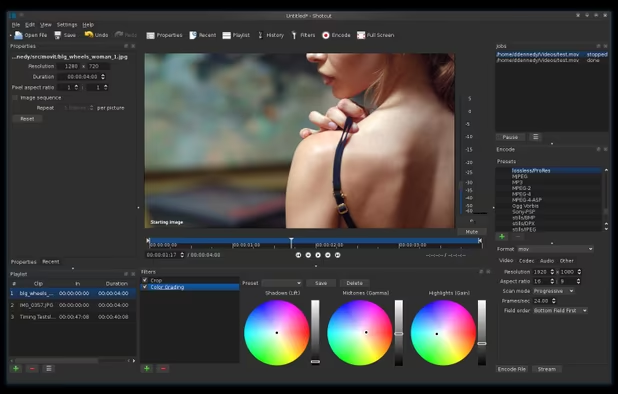
    Shotcut screenshot 3
  4. OpenShot icon
     Like
    • 64-bit only available,
    • Frequent Crash,
    • High Resource Usage,
    • Text file need to save as individual file,
    • Video Preview are not working,
    • Buggy Tutorial Mode

    Cost / License

    • Free
    • Open Source

    Application type

    Platforms

    • Mac
    • Windows
    • Linux
    • Flathub
    OpenShot 3.3 interface
    Theme variation
    OpenShot screenshot 2
    +4
    OpenShot screenshot 3
  5. VEGAS Pro icon
     Like

    It is Commercial tool

    Cost / License

    • Paid
    • Proprietary

    Application type

    Platforms

    • Windows
    • Steam
    VEGAS Pro screenshot 1
    VEGAS Pro screenshot 1
    VEGAS Pro screenshot 2
    +1
    VEGAS Pro screenshot 3
    • need user account to use it,
    • No user friendly,
    • Cumbersome UI.,
    • Imports only some clips since does not manage different frame rates in one project,
    • Frequent locks,
    • Difficult zooming and syncro video/audio,
    • Playback not working with xvid coded clips (XVID!)

    Cost / License

    • Freemium
    • Proprietary

    Application type

    Platforms

    • Mac
    • Windows
    • Linux
    Lightworks screenshot 1
    Trimming
    Multiple viewers
    +2
    Fx
  6. Kdenlive icon
     Like
    • 64-bit only available,
    • Require FFMPEG to use,
    • More Coming Soon~

    Cost / License

    • Free
    • Open Source

    Platforms

    • Mac
    • Windows
    • Linux
    • BSD
    • KDE Plasma
    • Snapcraft
    • Flathub
    • Flatpak
    Logging
    Editing
    Audio
    +2
    Effects
  7. Blender icon
     Like
    • Portableapps Support,
    • but Not user friendly

    Cost / License

    • Free
    • Open Source

    Application types

    Platforms

    • Mac
    • Windows
    • Linux
    • BSD
    • Flathub
    • PortableApps.com
    • Haiku
    • Steam
    • Flatpak
    • Snapcraft
    Splash Artwork for Blender 4.3
    Cycles Render Engine
    Modeling, Sculpt, UV
    +9
    VFX
    • It is Commercial tool that meets Industry Standard Video Editor with CUDA Fast Rendering
    • but Not User Friendly,
    • High Resource Usage,
    • MKV,FLV are not supported,
    • Sequence setting need to be reconfigured or video display will be cropped

    Cost / License

    • Paid
    • Proprietary

    Application type

    Platforms

    • Mac
    • Windows
    • iPhone
    • iPad
    Adobe Premiere Pro screenshot 1
    Adobe Premiere Pro screenshot 1
    Adobe Premiere Pro screenshot 2
No comments so far, maybe you want to be first?
Gu