Virtualization and containers technologies

  • Virtualization technologies
  • Virtual Environment
  • Application containers
wa
wallygator1List by wallygator1, last updated 
Copy a direct link to this comment to your clipboard
  1. Level 1 virtualization

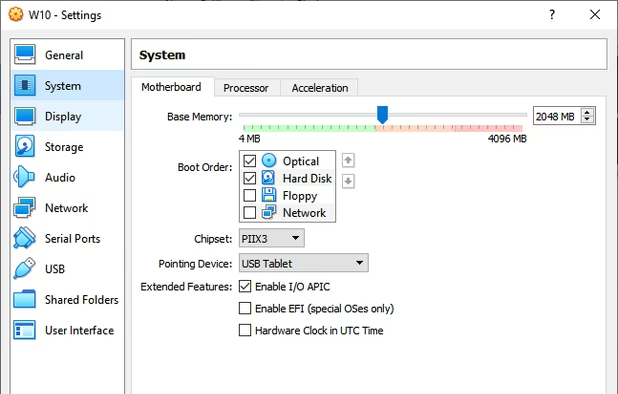
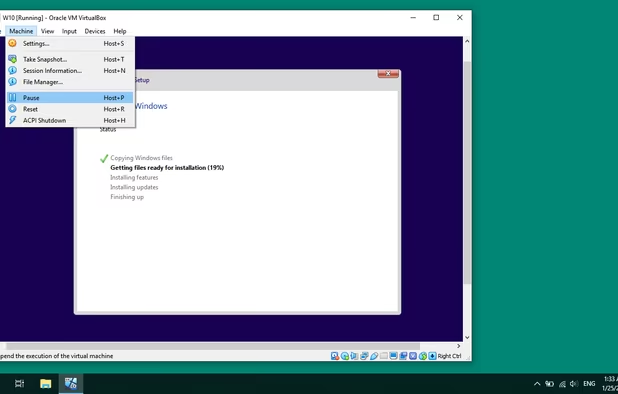
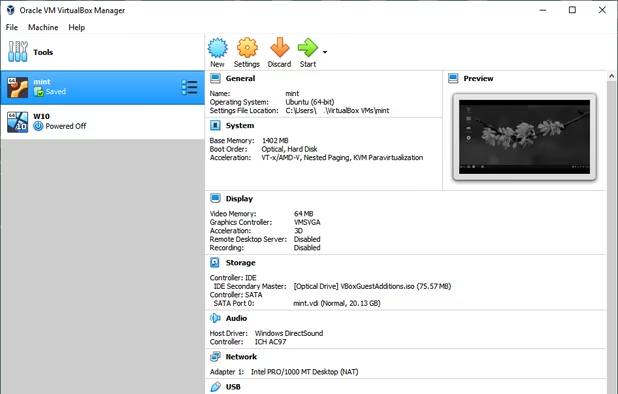
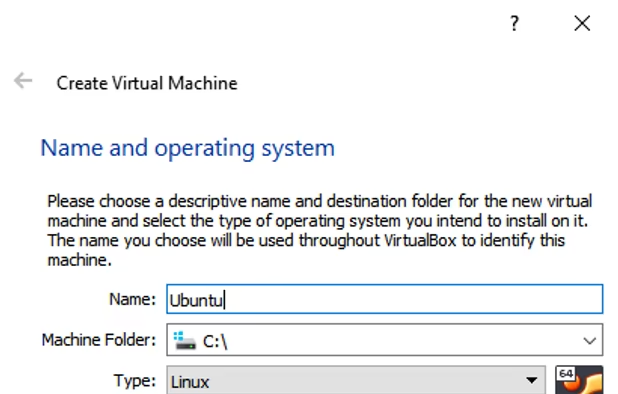
    In the kernel

  2. Microsoft Hyper-V Server is a free product that delivers enterprise-class virtualization for your datacenter and hybrid cloud.

    Cost / License

    • Free
    • Proprietary

    Application type

    Platforms

    • Windows
    sconfig
  3. Proxmox Virtual Environment is a complete and easy to use Open Source virtualization platform for running Virtual Appliances and Virtual Machines. Proxmox VE tightly integrates KVM hypervisor and LXC containers, software-defined storage and networking functionality on a single...

    Cost / License

    • Freemium
    • Open Source

    Application type

    Platforms

    • Windows
    • Linux
    • Android
    • Android Tablet
    Proxmox Virtual Environment screenshot 1
    Proxmox Virtual Environment screenshot 1
    Proxmox Virtual Environment screenshot 2
    +2
    Proxmox Virtual Environment screenshot 3
  4. QEMU icon
     Like

    Open-source hypervisor emulating CPUs via dynamic translation. Supports unmodified guest OS, allows mixed binary translation and native execution.

    Cost / License

    • Free
    • Open Source

    Application type

    Platforms

    • Mac
    • Windows
    • Linux
    • BSD
    QEMU  with the free OS ReactOS
    Hardware Configuration of a VMware machine
    Harddisk based on a VMware vmdk-file
    +1
    Advanced settings of a vmdk-machine
  5. KVM (for Kernel-based Virtual Machine) is a full virtualization solution for Linux on x86 hardware containing virtualization extensions (Intel VT or AMD-V). It consists of a loadable kernel module, kvm.

    Cost / License

    • Free
    • Open Source

    Application type

    Platforms

    • Linux
    • Android
    KVM (Kernel-based Virtual Machine) screenshot 1
  6. Level 2 virtualization

    As an application

  7. Desktop interface for managing virtual machines. It supports KVM, Xen, and Linux Containers, providing a summary of performance and resource stats.

    Cost / License

    • Free
    • Open Source

    Application type

    Platforms

    • Linux
    • BSD
    • Flathub
    • Flatpak
    virt-manager screenshot 1
    virt-manager screenshot 1
    virt-manager screenshot 2
  8. Open source virtualization tool supporting x86/AMD64, runs on Windows, Linux, Mac, Solaris. Offers portable, lightweight, ad-free use.
    Cost / License

    • Free
    • Open Source

    Application type

    Platforms

    • Mac
    • Windows
    • Linux
    • BSD
    • Oracle Solaris
    VirtualBox Manager
    Create Virtual Machine
    Setting of an OS
    +5
    Instaling Windows 10 as Virtual Machine
  9. Virtual Environment

  10. Containers which offer an environment as close as possible as the one you'd get from a VM but without the overhead that comes with running a separate kernel and simulating all the hardware.

    Cost / License

    • Free
    • Open Source

    Application type

    Platforms

    • Linux
    Linux Containers (LXC) screenshot 1
  11. Application containers

  12. This tool allows to browse, manage lifecycle of containers, inspect containers, images from different container engines. It includes a tray icon support. It can connect to multiple engines at the same time and provides an unified interface.

    Cost / License

    • Free
    • Open Source

    Platforms

    • Mac
    • Windows
    • Linux
    • Flathub
    Podman Desktop screenshot 1
  13. Podman icon
     Like

    Podman is a daemon-less container runtime for managing containers, pods, and container images. It is intended as a counterpart to CRI-O, to provide low-level debugging not available through the CRI interface used by Kubernetes.

    Cost / License

    • Free
    • Open Source

    Application type

    Platforms

    • Mac
    • Windows
    • Linux
    • Red Hat
    Manage containers. Part 1 of 3. Supported engines and orchestrators include Podman, Docker, Lima, kind, Red Hat OpenShift, Red Hat OpenShift Developer Sandbox.
    Manage containers. Part 2 of 3.
    Manage containers. Part 3 of 3. Using Terminal.
    +5
    Build, pull, and push images. Part 1 of 3.

Build containers from a Dockerfile / Containerfile, or pull images from remote repositories to run.

Manage accounts for and push your images to multiple container registries.
  14. Docker icon
     Like

    Docker is an open-source engine that automates the deployment of any application as a lightweight, portable, self-sufficient container that will run virtually anywhere.

    Cost / License

    • Freemium
    • Open Source

    Platforms

    • Mac
    • Windows
    • Linux
    • Online
    • Self-Hosted
    • TrueNAS
    Docker screenshot 1
    Docker screenshot 1
  15. An industry-standard container runtime with an emphasis on simplicity, robustness and portability

    Cost / License

    • Free
    • Open Source

    Application type

    Platforms

    • Linux
    • Self-Hosted
  16. Orchestration

    Container orchestration, clustering and management

  17. Portainer icon
     Like

    Portainer Community Edition is a lightweight service delivery platform for containerized applications that can be used to manage Docker, Swarm, and Kubernetes environments. It is designed to be as simple to deploy as it is to use.

    Cost / License

    • Free Personal
    • Open Source

    Platforms

    • Windows
    • Linux
    • Docker
    • Self-Hosted
    • Kubernetes
    Portainer screenshot 1
    Portainer screenshot 1
    Portainer screenshot 2
    +6
    Portainer screenshot 3
  18. Docker Swarm is native clustering for Docker. It allows you create and access to a pool of Docker hosts using the full suite of Docker tools. Because Docker Swarm serves the standard Docker API, any tool that already communicates with a Docker daemon can use Swarm to...

    Cost / License

    • Free
    • Proprietary

    Platforms

    • Mac
    • Windows
    • Linux
    • Self-Hosted
    • Docker
No comments so far, maybe you want to be first?
Gu