Data analysis for research

Jacob Sierra Díaz
Jacob Sierra DíazList by Jacob Sierra Díaz, last updated 
Copy a direct link to this comment to your clipboard
  1. Popular spreadsheet

    This is the typical software to do basic (or even advance) data analysis. What I really like about these spreadsheets is that I can customize the input and output (such as changing colors). Although I use the following section to perform statistical analysis, I always prepare a preliminar dataset using one of the following software.

  2. (1.1) M.O. Excel is the main spreadsheet that I use to prepare my dataset before using a specific statistical package. What I love most is that I can color the cells, which is very visual for reviewing the dataset.

    Cost / License

    • Paid
    • Proprietary

    Platforms

    • Mac
    • Windows
    • Android
    • iPhone
    • Android Tablet
    • Windows Phone
    • iPad
    excel 365
    A new document in Excel 2013 on Windows 8
  3. Numbers icon
     Like

    (1.2) Well, this is a great alternative for Excel. Sometimes I used the iCloud version, specially when I have to use a computer that is not mine.

    Cost / License

    • Free
    • Proprietary

    Application type

    Platforms

    • Mac
    • Online
    • iPhone
    • iPad
    Numbers screenshot 1
    Numbers screenshot 1
    Numbers screenshot 2
    +6
    Numbers screenshot 3
  4. Data analysis software

    When the spreadsheet is digitally prepared, I use specific software to conduct the analysis.

  5. (2.1) This is the most important statistical software in which I conduct the majority of statistical analysis. I really love the Graphical User Interface and the way IBM enable you to execute simple and complex analysis. It is very intuitive.

    Cost / License

    • Paid
    • Proprietary

    Application type

    Platforms

    • Mac
    • Windows
    • Linux
    IBM SPSS Statistics screenshot 1
    IBM SPSS Statistics screenshot 1
  6. (3.1) R is a programming language very useful to perform complex statistical analysis. You can create specific operations or use different functions by the myriad of macros available on the Internet. In addition, there is a powerful and interesting community around R. R only works by syntax (no Graphical User Interface such SPSS)

    Cost / License

    • Free
    • Open Source

    Platforms

    • Mac
    • Windows
    • Linux
    • BSD
    R (programming language) screenshot 1
    On Unix
    On Mac
  7. RStudio icon
     Like

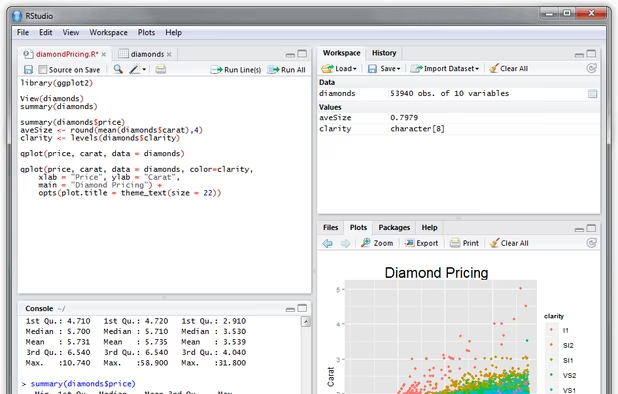
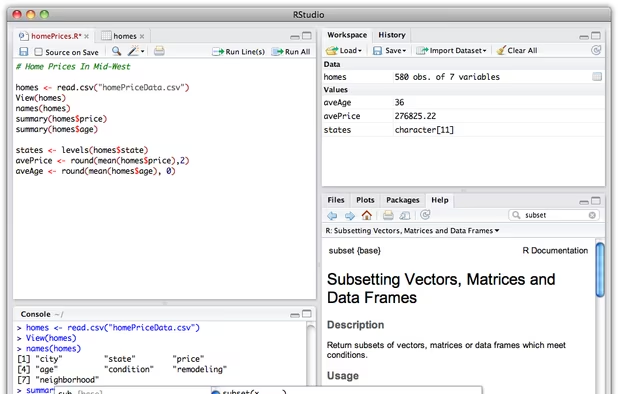
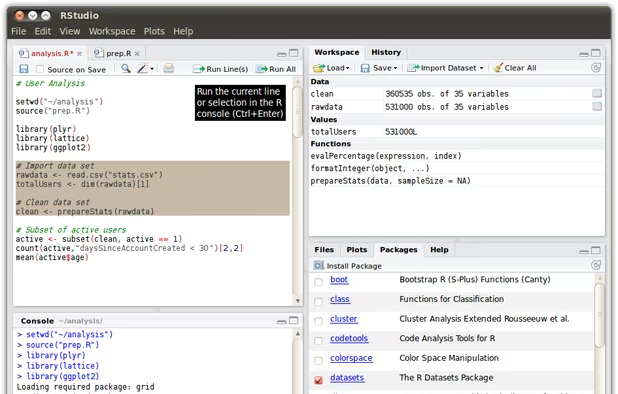
    (3.2) This is the "friendly" version of R. I love this application too, and help me to understand the operations and the syntax behind R.

    Cost / License

    • Free
    • Open Source

    Application type

    Platforms

    • Mac
    • Windows
    • Linux
    • Xfce
    RStudio on Windows
    RStudio on Mac OS X
    RStudio on Ubuntu Linux
    +1
    RStudio screenshot 3
  8. jamovi icon
     Like

    (4.1) A good (and free) alternative to SPSS or R is Jamovi. Here, you can conduct simple and complex data analysis in a user-friendly environment.

    Cost / License

    • Free
    • Open Source

    Application type

    Platforms

    • Mac
    • Windows
    • Linux
    • Flathub
    • Online
    jamovi screenshot 1
    jamovi screenshot 1
    jamovi screenshot 2
  9. Orange icon
     Like

    (5.1) Finally, Orange is a creative and relevant way to perform statistical analysis. It is very warm. I am sure that you will not consider Statistics boring anymore.

    Cost / License

    • Free
    • Open Source

    Application type

    Platforms

    • Mac
    • Windows
    • Linux
    A data mining workflow.
    Hierarchical clustering.
    Image analytics.
    +6
    Analysis of misclassified data instances.
  10. SR and MA

    When it comes to Systematic Reviews (SR) and Meta-analyses (MA), I prefer using specific software (although the previous ones have good macros to conduct meta-analysis).

  11. Mendeley icon
     Like

    (1) This is where I administrate my personal library of articles and handbooks when I conduct a systematic review. I recommend this application to everyone who is in the field of scientific research. Mendeley is also very useful to create citations and references.

    Cost / License

    • Freemium
    • Proprietary

    Platforms

    • Mac
    • Windows
    • Linux
    • Online
    Generate Bibliographies in Word and OpenOffice
    Annotate PDFs
    Sync from Zotero
    +2
    Compare Products
  12. Cadima icon
     Like

    (2) CADIMA help me to follow the necessary steps to conduct a Systematic Review (SR) and Meta-analysis. Here is when my colleagues and I perform the consistency check of the eligibility criteria of the candidates studies.

    Cost / License

    • Free
    • Proprietary

    Platforms

    • Online
    Consistency check preview
  13. (3) This is an intuitive software to perform meta-analyses. However, it is only available in Windows. You can use it on Mac with Virtual Machines.

    Cost / License

    • Paid
    • Proprietary

    Platforms

    • Windows
    Example of analysis with CMA
  14. ProMeta 3 icon
     Like

    (4) ProMeta 3 is an interesting free alternative to CMA.

    Cost / License

    • Free
    • Proprietary

    Platforms

    • Mac
    • Windows
    • Linux
    ProMeta 3 screenshot 1
    ProMeta 3 screenshot 1
    ProMeta 3 screenshot 2
  15. (5) If you are going to do a Cochrane Systematic Review and/or Meta-analysis, I strongly recommend you RevMan.

    Cost / License

    • Free Personal
    • Proprietary

    Platforms

    • Mac
    • Windows
    • Online
    RevMan main interface

What is your favorite data analysis software?

No comments so far, maybe you want to be first?
Gu