
ZoneClip icon
ZoneClip icon

ZoneClip

 15 likes

Turns long gaming VODs into reviewable vertical clips with AI-assisted highlight detection, reframing, captions, local rendering, and optional publishing.
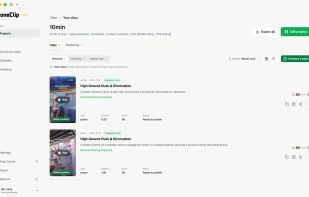
ZoneClip clip results with ranked Fortnite highlights, scores, source ranges, suggested copy, duration, and publishing status.

Cost / License

  • Free
  • Proprietary

Application type

Since

  • Since 2026

Platforms

  • Windows  Current beta supports Windows x64.
  • Mac  Current beta supports Apple silicon Macs.
15likes
0articles
Save

Features

Properties

Features

Highlights All activities

ZoneClip News & Activities

Recent activities

Comments and Reviews

   
Most Recent Comment
chen chris
0

very nice to video clip.

Review from a new or low-activity account — shown here, but not counted in the app rating.
111-Alina
0

Really solid non‑linear editor. Love how powerful its batch processing is. Multi‑track workflow works flawlessly. Cuts down hours of tedious work for bulk video projects. Renders reliably and supports most file formats. Worth trying out.

Review from a new or low-activity account — shown here, but not counted in the app rating.
Yukin
2

local first, free,ai

links000
1

ZoneClip is a local-first AI clipping tool built for gaming creators, helping you find the best moments in long livestreams and VODs, preserve the full story, and turn them into shareable short-form videos.

Review from a new or low-activity account — shown here, but not counted in the app rating.
kritt wu
1

Excellent tool with smooth performance, saves me tons of time on video tasks.

Review from a new or low-activity account — shown here, but not counted in the app rating.

Official Links

What is ZoneClip?

ZoneClip is a free, local-first AI gaming clip maker for long gameplay recordings and stream VODs. It finds and ranks complete highlights, gives each candidate a source range, score, and explanation, and turns selected moments into editable vertical clips for YouTube Shorts, TikTok, and Instagram Reels. Creators can adjust gameplay and facecam layouts, captions, timing, and visual layers before rendering from the original file on their own device. ZoneClip is available in beta for Windows x64 and macOS on Apple silicon. The free version has no watermark, no commercial-use restriction, and supports source-quality exports up to 4K and 60 FPS when the source provides them.

ZoneClip information

Our users have written 5 comments and reviews about ZoneClip, and it has gotten 15 likes.

ZoneClip was added to AlternativeTo by leoqliang on and this page was last updated .